How to map what already exists before you extend it, and why it is the most valuable mapping session your team will ever run.
What we cover in this article:
- Why legacy systems break the conventional story mapping playbook
- The four sources of truth for a legacy map
- How to run a legacy mapping session
- What you find when you map a legacy system
- Using the legacy map as a foundation for new development
- How AI agents change the legacy mapping exercise
The inheritance problem
Every product team eventually inherits something they did not build. A six-year-old invoicing platform. A codebase whose original architects have moved on. A Jira backlog with 400 tickets referencing concepts nobody can explain anymore. A Q3 commitment to extend a payments system that nobody on the current team fully understands.
Meet Katalin. She joined as Product Manager eight months ago, inheriting a B2B invoicing platform that has been running for six years. The platform handles invoice creation, sending, payment tracking, and reporting for hundreds of business customers. The two developers who originally built it left eighteen months ago. There is a Confluence space that was last updated in 2022. There is an engineering team of five who know parts of the system well but nobody who has the full picture. And there is a Q3 commitment (signed by the previous PM) to add a dispute resolution feature to the payments flow.
Katalin’s problem is not capability. The team is capable. The problem is that nobody knows exactly what the system currently does from a user’s perspective. Not in full. Not in the detail that would let the team safely extend it.
The default response in this situation is to start building anyway: reading the code, asking the longest-serving engineer, piecing together a mental model under deadline pressure. This works. Slowly. Expensively. And with a defect rate that reflects the gaps in that mental model.
This article is about the alternative. It is the story of how Katalin’s team mapped their existing invoicing platform before extending it and what they found when they did.
THE RUNNING EXAMPLE

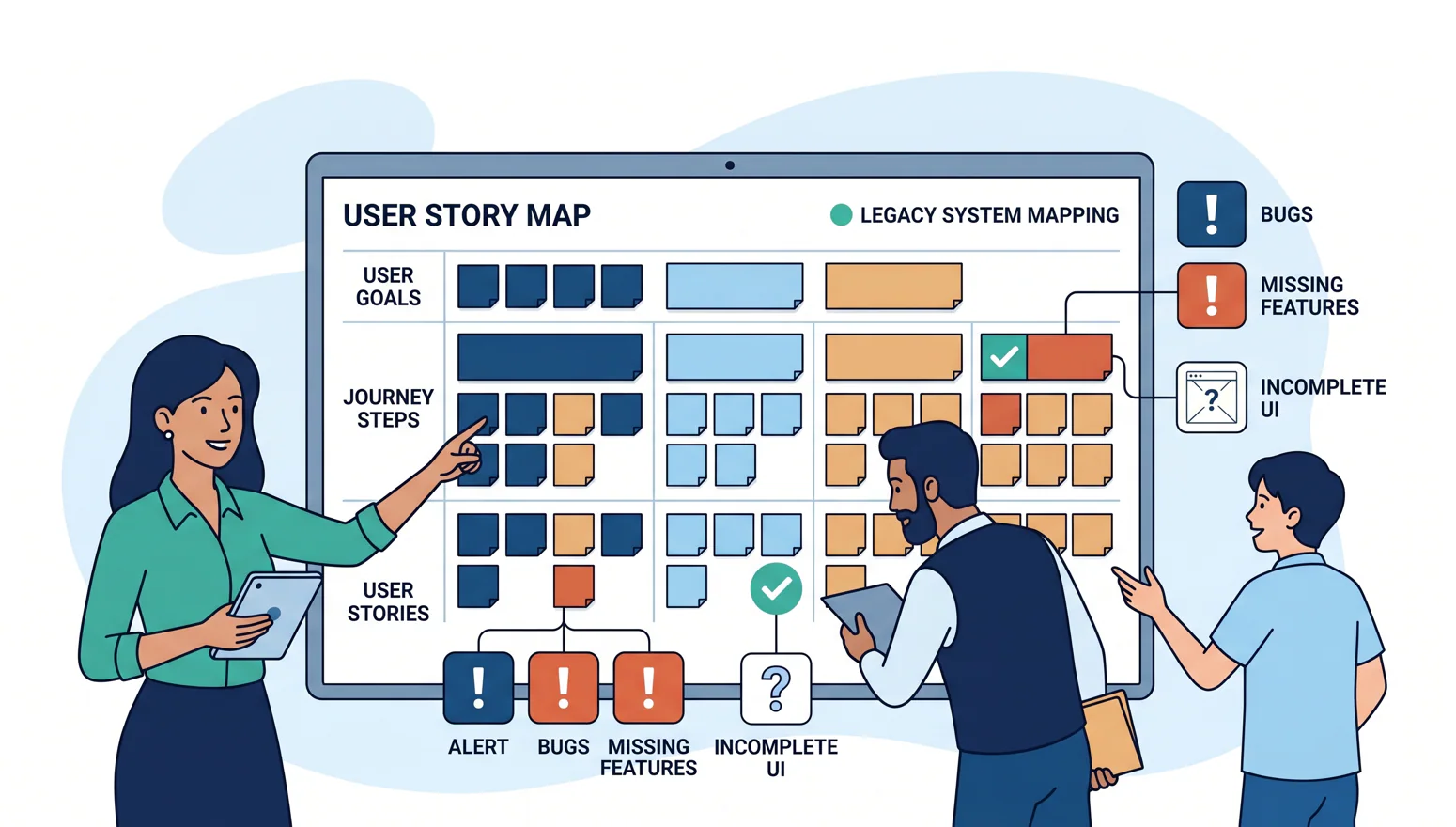
Throughout this article we follow Katalin's team and one product: a legacy B2B invoicing platform. Every story map illustration, every session step, every finding, and every recommendation uses this consistent example. By the end of the article you will have seen a complete legacy mapping exercise from first session to mapped foundation, using real story map structure: high-level goals at the top, user journey steps in the middle, and user stories at the bottom.
Why legacy systems break the conventional story mapping playbook
Story mapping was designed for greenfield
The canonical story mapping session, the one Jeff Patton describes, the one you have probably run or participated in starts with a user goal and works forward. You ask: what is the user trying to accomplish? You imagine the journey. You design the steps they take. You write the stories that implement each step. The map is a design artefact. It describes what you intend to build.
This works beautifully when you are starting from nothing. When you have a blank canvas and a user goal and the freedom to design the journey from first principles. Greenfield development is the context the classic story mapping exercise was designed for.
Legacy systems break this playbook immediately. You cannot imagine the journey because the journey already exists. You cannot design the steps because the steps are already implemented in code, in database schemas, in route handlers, in years of bug fixes and edge case handling that nobody documented. The starting point is not “what should users be able to do.” It is “what can users actually do right now, and how does the code implement it.”

Legacy systems demand a different starting point
When Katalin’s team ran their first story mapping session using the standard greenfield approach, they hit the problem immediately. They started writing high-level goals across the top of the map. That part went fine. Then they tried to write the journey steps, and the room split. Different team members had different mental models of what the invoicing flow actually did. The longest-serving developer knew the creation and sending flow well. The QA engineer knew the edge cases around payment states. Nobody knew the reporting section in detail because the original developer who built it had left.
They were not designing a new journey. They were arguing about an existing one without the ability to resolve the argument because the ground truth was in the code, not in the room.
The map is not a design artefact when the system already exists. It is a discovery artefact. You are not imagining the journey. You are excavating it.
The cost of skipping this step
What happens when teams extend a legacy system without mapping it first? Katalin had seen this pattern before joining the team. The previous PM had commissioned a new “payment status dashboard” feature without knowing that the payment status data model was structurally different for recurring subscriptions versus one-time invoices. The feature shipped. It showed incorrect status for 30% of customers. The fix took three sprints and a data migration.
This is the cost of building on an unmapped foundation. Not because the team was careless. Because they made reasonable assumptions about a system they did not fully understand, and the system did not behave the way they assumed.
The specific failure modes of skipping the legacy mapping exercise are predictable:
- Scope surprises in week three
A feature planned as an extension turns out to require a structural change to the data model because the existing implementation does not support the new case. - Journey conflicts
A new step in the user journey conflicts with an existing one that the team did not know was there or that they knew about but did not know was still in active use. - Defect propagation
A new feature is built on top of an existing defect, inheriting and amplifying it. Katalin would discover exactly this situation in her mapping exercise.
The three-level map and why it matters for legacy work
Before going further, it is worth being precise about what a story map looks like, because the three-level structure of a story map is what makes it the right tool for legacy discovery, not just for greenfield design.
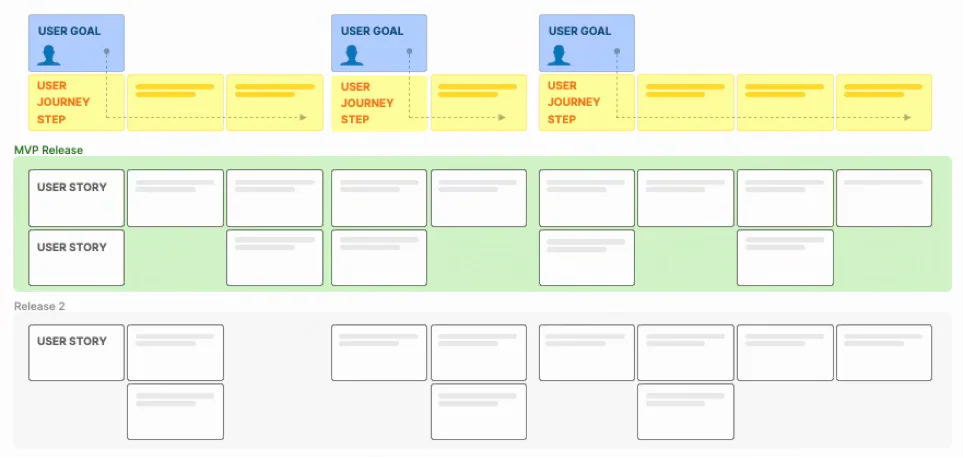
The top level contains the user’s high-level goals. It tells what the user is trying to accomplish. For Katalin’s invoicing platform: Get paid by my clients, Track what I’m owed, Resolve disputes, Understand my revenue. These are not features. They are goals. A user does not care about the technology. They care about getting paid.
The middle level contains the steps in the user journey. The sequence of actions the user takes to achieve each goal. Under “Get paid by my clients,” the steps are: Create invoice, Review and edit, Send to client, Track payment status. This is the user’s actual experience, in sequence, from their perspective.
The bottom level contains the user stories. The specific features and behaviours that implement each journey step. Under “Create invoice,” the stories are things like: “As a business owner, I want to add line items with descriptions and quantities, so that my client knows exactly what they are paying for.” Multiple stories implement each step. Some are in scope for the current release. Some are deferred. Some are already done. Some are missing entirely, this is what the legacy mapping exercise reveals.
For a legacy system, this three-level structure is exactly what you need. The goals tell you what the system is supposed to help users accomplish. The journey steps tell you how the system is supposed to guide them toward those goals. The user stories tell you what the system actually does and the gaps at the story level tell you what it does not do, or does incompletely, or does incorrectly.
The four sources of truth for a legacy map
Before the mapping session, you need to gather evidence. For a greenfield map, the evidence is user research and product intuition. For a legacy map, it is something more concrete and more humbling: the actual record of what the system does, not what anyone believes it does.
Katalin’s team used four sources. Each revealed something the others could not.
Source 1: The codebase
The codebase is the ground truth. It does not lie. It does not remember things incorrectly. It does not have a vested interest in the system working a particular way. Every route handler, service method, and database schema is a statement of what the system currently does, and reading it with a product lens rather than an engineering lens reveals the user-facing actions it supports.
For Katalin’s team, reading the codebase with a product lens meant looking at the invoicing service’s route handlers and asking: what user action does each of these correspond to? The POST to /invoices corresponds to the “Create invoice” story. The PUT to /invoices/:id/send corresponds to “Send to client.” The GET to /invoices/:id/status corresponds to “Track payment status.”
But there was also a POST to /disputes. And a GET to /disputes/:id. These existed in the codebase. They were not in anyone’s mental model of the system. Nobody on the team could explain what they did or whether they were reachable from the user interface. They became two of the most important findings of the mapping exercise.
READING CODE WITH A PRODUCT LENS

You are not looking for how the code works. You are looking for what the user can do. Each route handler that accepts user input is a user action. Each service method that changes system state is a story. Each database table is a domain object in the user's world. Translate engineering language into product language as you read and flag anything you cannot translate as a gap in your understanding.
Source 2: The existing tickets
Old Jira tickets, closed GitHub issues, archived sprint boards. These contain rationale that often does not exist anywhere else. The decision to structure the payment status model the way it was structured. The edge case that was explicitly deferred. The feature that was requested, built, and then turned off when a customer complained.
Katalin’s team found three things in the ticket history that changed the mapping exercise. First, a ticket from 2021 where the dispute endpoint was added but the ticket was closed as “incomplete” because the UI work was never finished. The backend existed. The frontend never shipped. Second, a ticket from 2023 where a customer reported incorrect payment status for subscription renewals, closed as “fixed” but with a comment noting that the fix was a workaround, not a structural solution. Third, a ticket from 2020 marking the recurring invoice feature as “out of scope”, meaning the entire recurring billing journey step was intentionally absent from the system.
Source 3: The long-tenured team member
Every legacy system has one person who has been there the longest and carries context that has never been written down. In Katalin’s team, it was the QA engineer, Andras, who had been on the system for four years.
The mistake most teams make is asking Andras to “explain the system” in a general sense. This produces a tour of features, not a map of the user journey. The better approach is structured: take the goals and journey steps you have drafted from the codebase and ticket history, and ask Andras to verify, correct, and annotate each one. Where are the edge cases? What breaks? What have customers complained about most? What was the thing that seemed simple but turned out to be complicated?
Andras told Katalin’s team something nobody else knew: that the payment status endpoint sometimes returned stale data for invoices that had been paid via bank transfer, because the bank transfer reconciliation job ran nightly rather than in real time. This was not in the code comments. It was not in the tickets. It was in Andras’s head, and it had been causing intermittent customer service queries for three years.
Source 4: The users themselves
Support tickets, customer interviews, and session recordings reveal the gap between the journey the team designed and the journey users actually take. This is often the most surprising source of truth in a legacy mapping exercise, not because users are doing something wrong, but because they have adapted to the system’s limitations in ways the team never anticipated.
Katalin reviewed six months of support tickets before the mapping session. Two patterns stood out. First, a recurring question about how to handle a disputed invoice. Customers were trying to use the system to manage disputes but had no way to do it, so they were emailing the support team manually for every dispute. Second, a pattern of customers creating a new invoice to correct a sent invoice they had made an error on, because there was no way to edit a sent invoice. This was a workaround that had been adopted as de facto behaviour, and nobody on the product team knew it was happening.
How to run a legacy mapping session
The first discipline: scope ruthlessly
The most common mistake in legacy mapping is attempting to map the entire system at once. For a system like Katalin’s (six years old, covering invoicing, sending, payment tracking, reporting, and a partial dispute flow) a full-system mapping exercise would take weeks and produce a map so large that the team loses the thread of what they are trying to accomplish.
The discipline is to scope to the product area directly relevant to the current delivery commitment. Katalin’s team had a Q3 commitment for dispute resolution. They scoped their mapping exercise to the payments and disputes domain. Not the entire invoicing system. Not the reporting section. The specific slice of the product that the new feature would live in and depend on.
This is not a compromise. It is the practice that makes the exercise completable, the findings immediately useful, and the process repeatable. After the payments domain is mapped, the next delivery commitment will take the team into another domain. Map that one then. Over two or three delivery cycles, the full system accumulates coverage, not as a documentation project, but as a byproduct of disciplined delivery.
THE SCOPING QUESTION

The right question is not "how much of the system can we map?" It is "what is the minimum mapping that gives us a safe foundation for the current commitment?" For Katalin's team, that was the payments and disputes domain. Everything else was deferred, not ignored, just deferred to when it becomes relevant.
The eight steps of a legacy mapping session
- Define the scope and the user goal:
Katalin’s team started with the user goal: “Get paid by my clients and resolve any payment disputes.” This defined the boundaries of the session. Every journey step, every story, every gap they found had to be evaluated against this goal. If it was not in service of this goal, it was out of scope for the session. - Walk the system as a user, not as a developer:
Before writing anything on the map, the team spent 90 minutes actually using the system: creating invoices, sending them, tracking payment status, trying to initiate a dispute. They took notes not on what they saw in the code, but on what they experienced as users. What was possible. What was blocked. What was confusing - Draft the high-level goals across the top:
Based on the user walk-through and the source review, the team drafted four high-level goals across the top of the map:Create invoice, Send to client, Track payment, Resolve dispute.These are what the user is trying to accomplish, not features, not technical components, not epics. - Identify the journey steps under each goal:
Under each goal, the team wrote the specific steps the user takes to accomplish it. UnderCreate invoice: Add line items, Set recipient, Apply tax, Preview invoice. UnderSend to client: Review before sending, Choose delivery method, Send, Confirm delivery. UnderTrack payment: View payment status, Receive payment notification, Mark as reconciled. UnderResolve dispute: this is where the map went blank, nobody could confidently describe the current journey steps because the flow had never been completed. - Write user stories from code behaviour, not from intention:
For each journey step that existed, the team wrote user stories describing what the system currently does. “As a business owner, I want to add line items with a description and quantity, so that my client understands what they are paying for.” “As a business owner, I want to preview the invoice before sending, so that I can catch errors before my client sees them.” These were not aspirational stories. They were descriptions of behaviour the code already implemented. - Write acceptance criteria from what the code actually validates:
For each story, the team wrote acceptance criteria based on the actual validation logic in the service layer. The validateLineItems() method enforced that at least one line item must exist and that quantities must be positive integers. That became: “Given a new invoice, when I try to send it with no line items, then the system prevents sending and displays an error.” The code behaviour became the acceptance criterion. - Identify the gaps — steps with no stories:
TheResolve dispute goal had no journey steps with stories. TheResolve dispute step itself had two partial code paths (the dispute endpoints Andras found) but no complete user-facing stories. These went on the map as explicitly blank: not missing from the map, but present as gaps, classified and visible. - Classify each gap:
Not all gaps are the same. The team classified each one using the four-type framework described in the next chapter. This classification conversation was the most valuable part of the session, more valuable than the stories themselves, because it made implicit assumptions explicit and turned unknown risks into known decisions.
What the map looked like after the session
After two days of mapping work, one day of preparation and one day of session with the engineering team Katalin’s team had their first complete view of the payments and disputes domain.
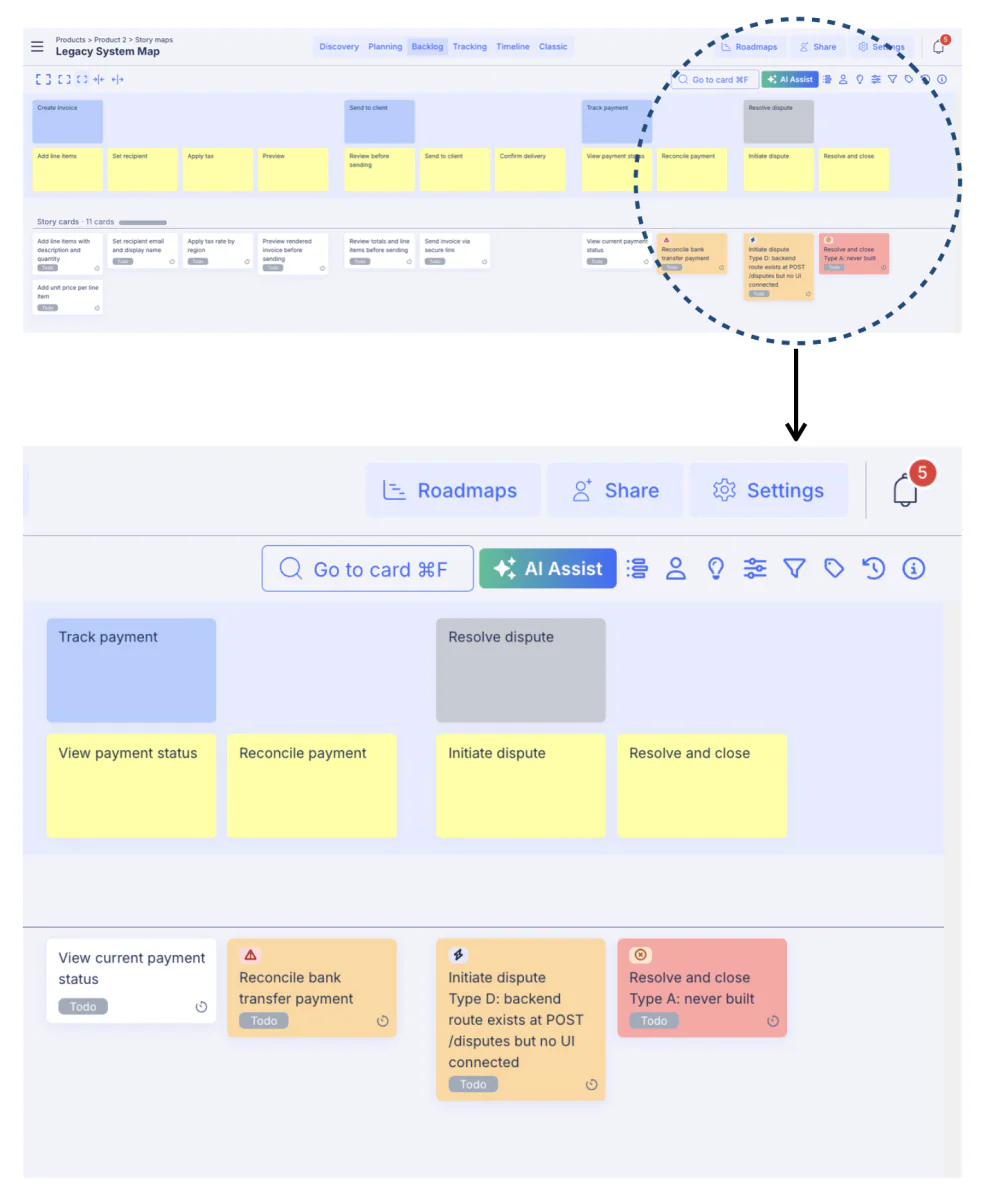
Review the Legacy System project on StoriesOnBoard live: CLICK HERE!
The engineering review session
The map drafted from the codebase and ticket history was not the final map. It was the starting point for a half-day engineering review. The session where developers who knew parts of the system verified, corrected, and annotated what the team had drafted.
In Katalin’s review session, three things happened:
- First, the senior developer found two edge cases under “Add line items” that were not in the drafted stories: line items with zero quantity were allowed by the UI but rejected by the payment gateway, causing silent failures. These became two new stories with explicit acceptance criteria.
- Second, the QA engineer confirmed the bank transfer reconciliation issue and added the nightly job dependency as a noted constraint on the “Track payment status” story.
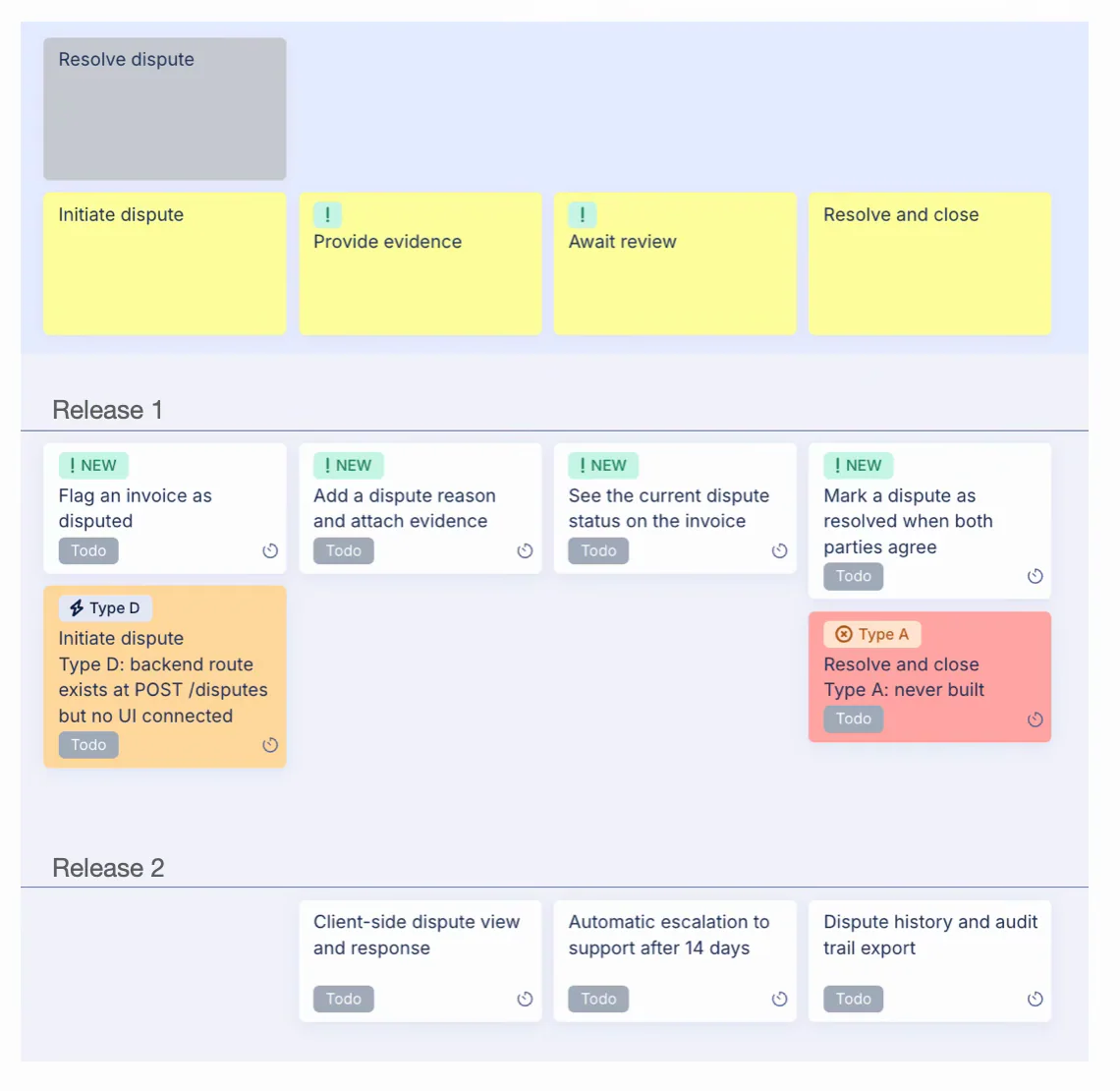
- Third, the team discovered that the dispute code paths (the endpoints that existed in the codebase) had never been connected to any user interface. The backend was there. The frontend had never shipped. This was the Type D gap: code that existed but had never been intentionally designed as a user-facing feature.
A well established product team can read the map and point out critical information right away.
What you find when you map a legacy system
Every legacy mapping exercise produces four categories of finding. They are predictable in type, even if the specific instances are always surprising. Katalin’s team found all four in their invoicing platform. Understanding the categories in advance helps the team know what to do with each finding, and avoid the trap of treating all gaps the same way.
The gap classification framework
Type A – Deliberate
- Definition:
This journey step was intentionally left unimplemented. A conscious decision was made not to build it, and the decision was correct at the time. - What to do:
Document the decision rationale on the map. Revisit only if the business case has changed. - Example:
Recurring invoices. A 2020 ticket explicitly marked this as out of scope. The decision still holds, the team’s customer base does not need recurring billing.
Type B — Known omission
- Definition:
The team knows this step is missing and has actively decided to defer it. It is on someone’s roadmap but has not been prioritized. - What to do:
Add a placeholder story to the map. Confirm the deferral is still intentional. If the new feature depends on it, this becomes a blocker to acknowledge. - Example:
Bulk invoice sending. The team had discussed this for two years but never prioritised it. Confirmed deferred, added to the map as a placeholder.
Type C — Unknown
- Definition:
The gap exists for reasons nobody can explain. The step is missing, but there is no record of a decision to omit it. It may have been forgotten, may have been dropped mid-development, or may have never been considered. - What to do:
Investigate before building on anything adjacent. Unknown gaps often reveal systemic issues in the implementation that affect other steps. - Example:
Invoice editing after sending. Customers are creating new invoices to correct errors on sent ones, a workaround that nobody on the team knew was happening because no decision to omit editing was ever made.
Type D — Defect
- Definition:
A code path exists but has never been intentionally designed as a user-facing feature. The system does something but it was never planned, tested, or released as a deliberate product decision. - What to do:
Treat as a defect. Do not build on top of it. Assess whether it is exposing users to risk. Either remove it or design it properly before the new feature touches it. - Example:
The dispute endpoints. Backend code existed for dispute creation and retrieval. No UI had ever shipped. Customers could not access this path. The Q3 dispute feature would have built on top of this unintentionally, potentially exposing the incomplete implementation.
The finding that changed the Q3 plan
For Katalin’s team, the most important finding was the Type D gap. The dispute endpoints that existed in the codebase but had never been connected to a user interface. This finding changed the Q3 plan before a single line of new code was written.
The original assumption was that the dispute resolution feature was adding UI to existing functionality. The code was already there, the team just needed to build the frontend. The mapping exercise revealed that this assumption was wrong. The backend code was not production-ready. It had been written as a partial implementation years ago, never finished, never tested at scale, never integrated with the payment reconciliation system. Building a production dispute flow on top of it would have required either a significant backend refactor or a new implementation.
This discovery happened in week one of the mapping exercise. Not in week three of the sprint. Not in QA. Not in production. The scope correction extending the estimate, adjusting the release scope, communicating the change to stakeholders happened as a planning decision rather than a crisis.
The most valuable thing a legacy mapping exercise can produce is not a complete map. It is a scope correction that happens before the sprint starts rather than after the code ships.
The dead code paths
In addition to the dispute endpoints, the team found two other code paths that existed but were no longer reachable from the user interface. An old PDF generation endpoint from a version of the system that used to produce downloadable invoice PDFs, replaced two years ago by a link-based system, but never removed from the codebase. And a batch status update endpoint that had been used by an internal tool which was itself decommissioned eighteen months ago.
Neither of these was dangerous on its own. But both appeared in the initial code review as potentially relevant to the dispute resolution feature, consuming analysis time before the team confirmed they were dead paths. Adding them to the map, marked explicitly as dead code, saved the same analysis time from being repeated by anyone who touched the codebase in future.
The undocumented behaviour
Andras’s knowledge of the bank transfer reconciliation issue became the most practically important finding outside the dispute gap. The nightly reconciliation job meant that an invoice could show as “pending” for up to 24 hours after a bank transfer payment was received. Three customers had opened support tickets about this in the past six months, and in each case the support team had manually updated the status rather than fixing the root cause.
This behaviour was not in the story map before the mapping exercise. After the exercise, it was documented as a known limitation on the “Track payment status” journey step, with an explicit acceptance criterion: “Given a bank transfer payment, when the payment is received, the status may reflect ‘pending’ for up to 24 hours pending reconciliation, and a tooltip must indicate this.” The new dispute resolution feature needed to handle this case. If a customer initiated a dispute on an invoice that was actually paid but not yet reconciled, the dispute should not be created. This constraint was discovered in the mapping exercise. It would not have been discovered until integration testing otherwise.
Using the legacy map as a foundation for new development
Placing new stories alongside existing ones
With the legacy map verified and corrected, Katalin’s team had what they had never had before: a structured, accurate view of what the invoicing platform currently did from the user’s perspective. Every journey step in the payments and disputes domain was on the map. Every story was either verified, annotated with a known issue, or explicitly marked as a gap with a classification.
Now they could place the new dispute resolution stories alongside the existing ones and not as a separate feature track, but as a coherent extension of the user journey that the map already described. The new stories went under the “Resolve dispute” goal, which now had two journey steps clearly defined: “Initiate dispute” and “Resolve and close.” Each new story was written with full awareness of what the existing journey looked like, what constraints the adjacent stories imposed, and what the user was doing before and after the dispute step.
Review the Legacy System project on StoriesOnBoard live: CLICK HERE!
Journey-complete release planning
The release slice Katalin’s team drew was not defined by how many story points they had available. It was defined by the question: what is the minimum set of journey steps that gives a user a complete, coherent dispute resolution experience?
The answer was four steps: initiate a dispute, provide evidence, await review, and resolve and close. A user who can complete all four steps can resolve a dispute end to end. A user who can only complete the first two cannot, the experience is broken, regardless of how polished those first two steps are.
This is what journey-complete release planning looks like. The horizontal slice line on the map is drawn not across stories of a given priority level, but across the point where the user journey becomes coherent. Everything above the line ships together. Everything below it is explicitly deferred, not forgotten, not deprioritised in a vague future backlog, but placed on the map as named, classified stories for the next release.
The client-side dispute view, the automatic escalation logic, and the audit trail export were all deferred to Release 2. The team and stakeholders agreed on this scope because the map made the trade-off visible. You could see that a business owner could complete a dispute end to end in Release 1. You could see what they could not do until Release 2. The conversation was about user capability, not about feature lists and that conversation is always faster and cleaner.
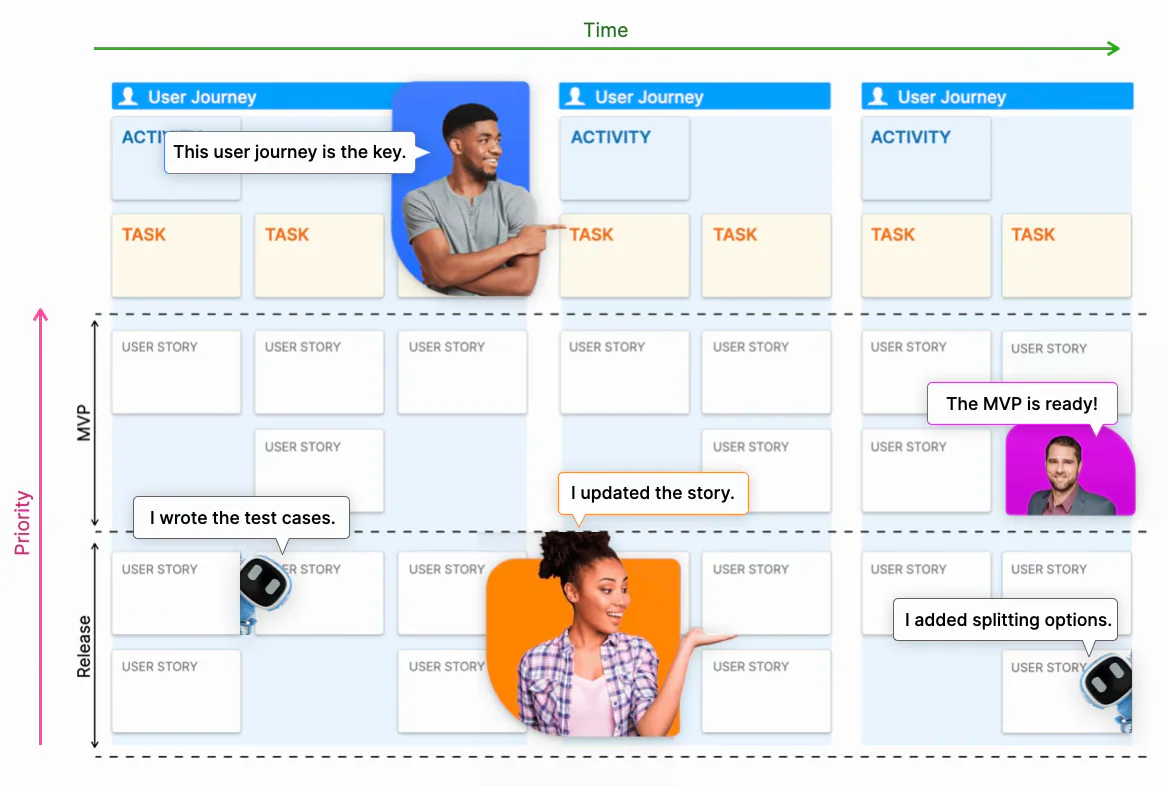
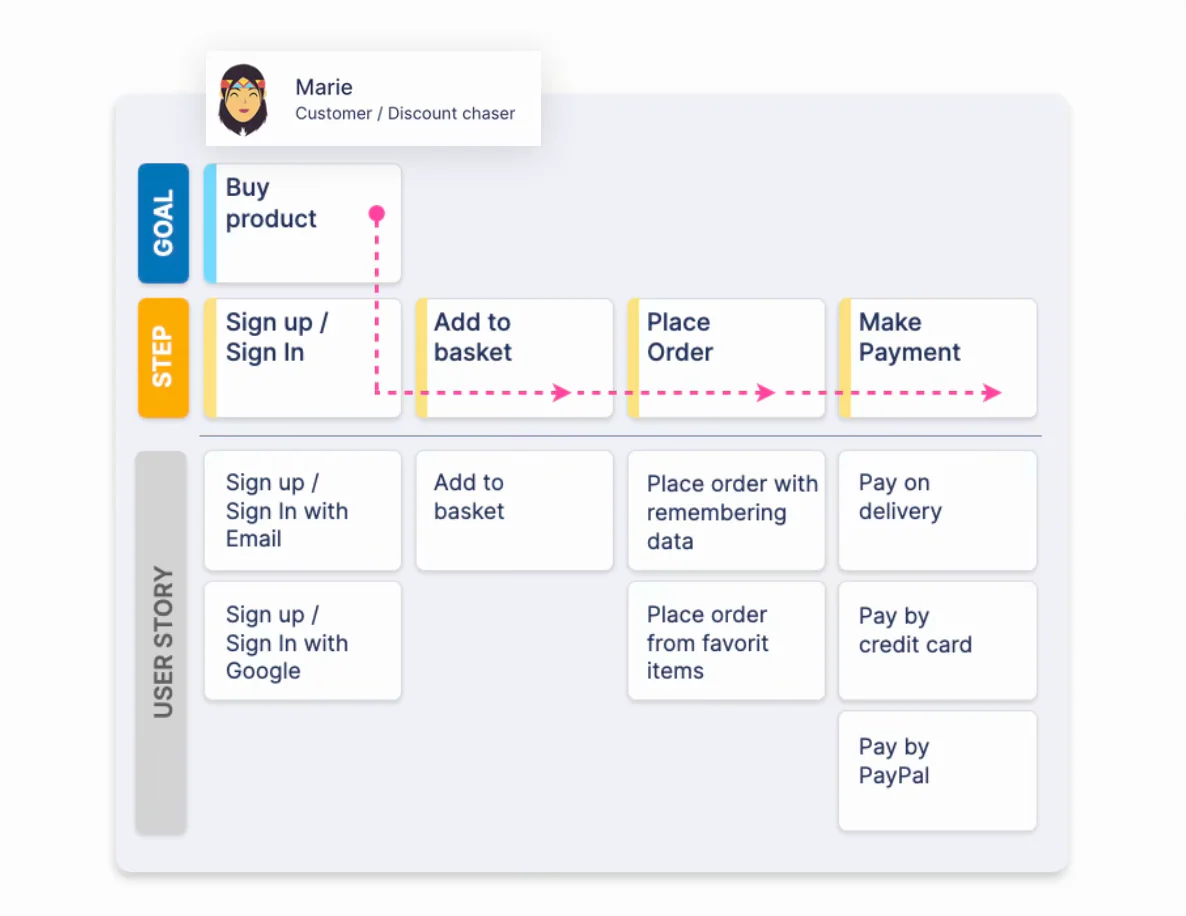
The easiest user journey example to illustrate the story map’s readability:
The map as onboarding infrastructure
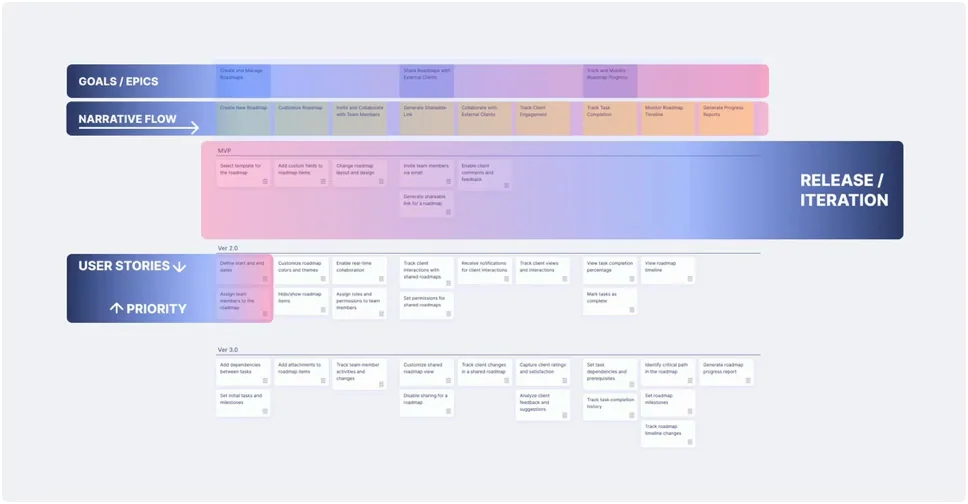
Three weeks after the mapping exercise concluded, Katalin’s team hired a new backend developer (Petra) to help with the dispute resolution implementation. In a previous project, Petra’s onboarding would have been a Jira tour, a Confluence dive, and two weeks of code archaeology.
This time, Petra was handed the story map on day one. Within two hours she understood the user goals of the payments domain, the journey steps under each goal, and the specific stories she was responsible for implementing. She understood why the reconciliation constraint existed and how it affected the dispute initiation story. She understood which stories were deferred and why. She understood the two dead code paths (the PDF endpoint and the batch updater) and knew not to dig into them.
By end of day two she had written her first acceptance criteria for the “Initiate dispute” story that reflected the reconciliation edge case correctly, without needing to ask anyone about it, because the edge case was documented on the map.
How AI agents change the legacy mapping exercise
The source-to-map workflow
Katalin’s team ran their legacy mapping exercise manually: reading the codebase, reviewing tickets, interviewing Andras, walking the system as users. This took two days of preparation and one day of session. For a scoped domain of a six-year-old system, that is a reasonable investment. For a larger domain, or for a team that needs to map multiple domains in quick succession, it is a significant overhead.
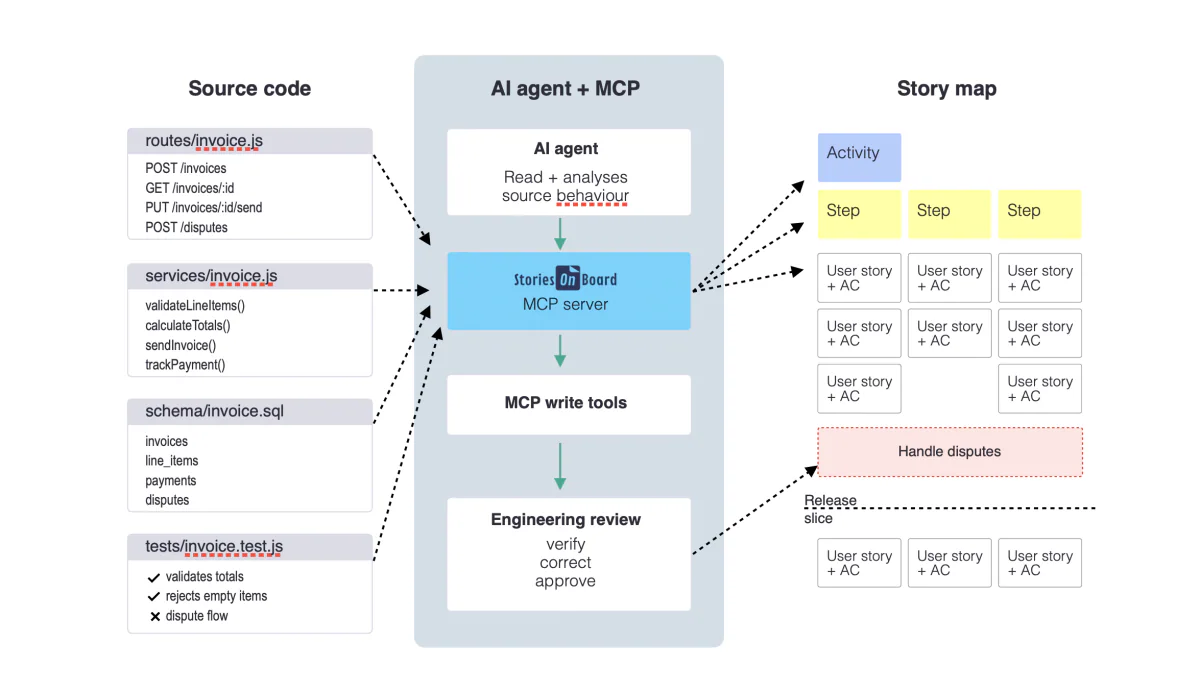
The source-to-map workflow changes this. An AI agent connected to the codebase and to StoriesOnBoard via the MCP server can read the route handlers, service methods, and database schemas for a scoped domain and draft the map (high-level goals, journey steps, and user stories with acceptance criteria) in hours rather than days. The team’s job shifts from building the draft to verifying and correcting it.
What would this have looked like for Katalin’s team? The agent would read the invoicing service’s codebase, identify the user-facing actions in the payments domain, and draft:
Under the “Track payment” goal, journey step “Track status,” a story: “As a business owner, I want to view the current payment status of a sent invoice, so that I know whether payment has been received.” Acceptance criteria from the code: “Given an invoice that has been sent, when I view the invoice detail, then the payment status is shown as Pending, Partially Paid, or Paid based on the most recent reconciliation run.” The phrase “most recent reconciliation run” would flag the nightly job dependency, derived from the code itself, not from anyone’s memory.
And under the “Resolve dispute” goal, the agent would draft two journey steps (“Initiate dispute” and “Resolve and close”) with a note: “Route handlers exist at POST /disputes and GET /disputes/:id but no stories could be derived from user-facing behaviour. These paths appear to be unconnected to the user interface. Flagging as potential Type D gap for team review.”
The Type D gap (the finding that changed the Q3 plan) would have surfaced in the draft map rather than in the engineering review session. The planning correction would have happened faster.
What the agent can and cannot do
Honest account matters here. The agent excels at the parts of the legacy mapping exercise that are high-volume and systematic: reading every route handler, covering every service method, producing a consistent story format across the entire domain. It never gets tired. It never misses a file because it was focused on something more interesting. It applies the same level of attention to the twenty-third endpoint as to the first.
But the agent cannot replace three things. First, the gap classification conversation, deciding whether a gap is Type A, B, C, or D requires knowledge of organisational history and intent that is not in the codebase. Second, the edge case knowledge that Andras carried about the bank transfer reconciliation behaviour. Knowledge that was in no file, no ticket, and no schema, but only in a person’s memory. Third, the user behaviour patterns from support tickets and session recordings. The invoice correction workaround that customers had adopted was invisible to the codebase because it was a workaround, not a feature.
The right framing is not “AI replaces the legacy mapping session.” It is “AI accelerates the draft phase so the team can spend more time on the verification and classification conversation, which is where the highest-value work happens.”
The MCP server and the elimination of the translation step
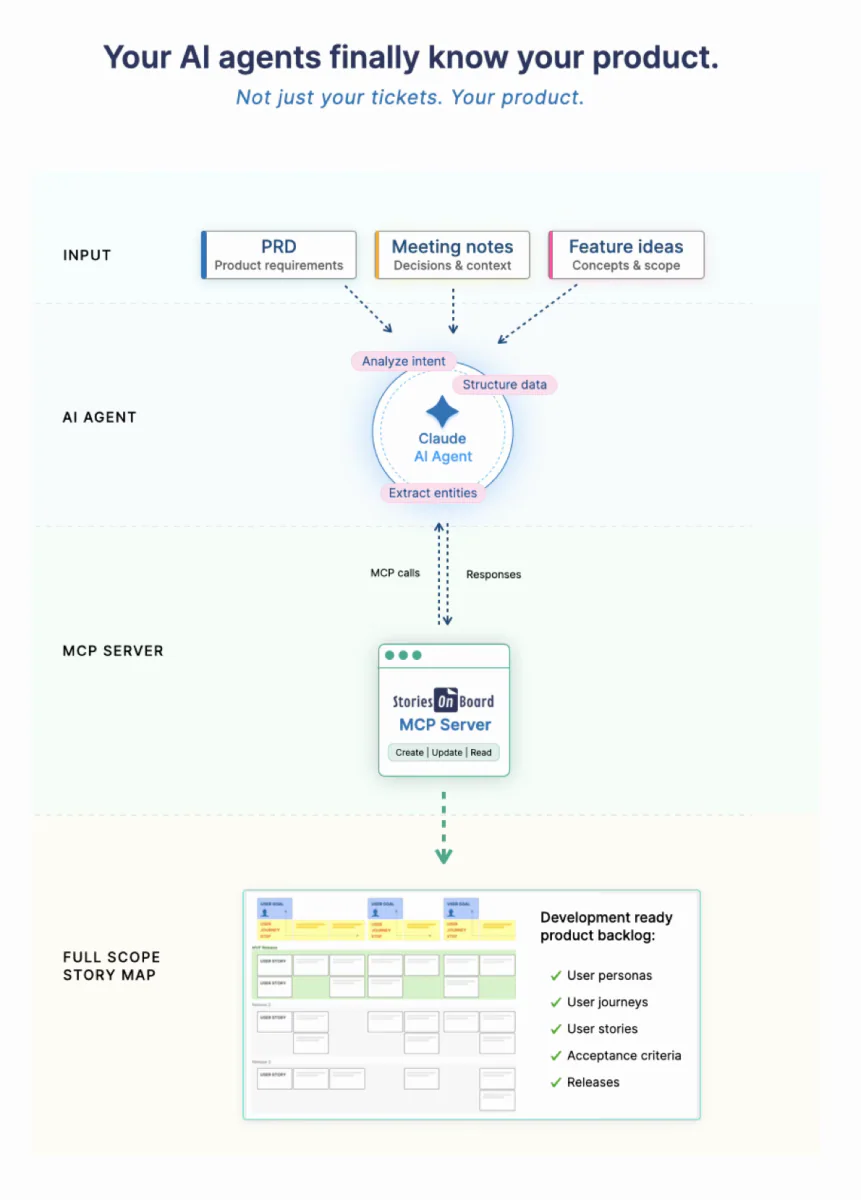
Teams who have tried AI-assisted legacy mapping without a direct map connection typically hit the same obstacle: the agent produces a document: a text file, a spreadsheet, a Notion page. And someone has to translate that document into the story map tool. This translation step takes hours, introduces errors, and loses structural nuance. Because it is painful, it does not happen consistently. The workflow does not become a team practice.
When the agent writes directly to StoriesOnBoard via the MCP server and placing each drafted goal, journey step, and story in the correct position in the map hierarchy, the translation step disappears. Katalin’s team would open StoriesOnBoard after the agent’s source-reading session and find a structured draft, positioned correctly, with acceptance criteria already attached. They would click into each story, read the agent’s reasoning, and verify or correct it. The review session becomes focused on judgment rather than data entry.
Repeating the process across the system
The most powerful property of this workflow is repeatability. The first time Katalin’s team ran it manually, over three days. There was a learning curve. The second time, for the reporting domain, the process was known. By the third delivery cycle, mapping the next domain before extending it had become the team’s default practice. Not a documentation project. Not a special initiative. A delivery discipline.
A team that maps each product area before extending it will, within two to three product cycles, have a complete story map of their entire legacy system, not as a big-bang effort, but as a byproduct of how they deliver. And every new developer who joins inherits not a codebase to excavate, but a map to read. Every AI agent they connect inherits not a black box to guess about, but a structured context to reason from.
THE COMPOUNDING RETURN

The first mapping exercise is an investment. The second is faster. The third is faster still. By the time the team has covered their major product domains, they have built an asset that compounds: every delivery cycle adds context, and every context addition makes every subsequent AI-assisted delivery more precise. The map that took three days to draft manually in cycle one produces its full value automatically in cycle four, when an agent reads it before implementing a feature and correctly handles a constraint that was documented eighteen months ago and that nobody on the current team knows about from memory.
The map you build before you build
Katalin’s team delivered the dispute resolution feature on time. Not because the development went perfectly, it never does. But because the major scope surprise was discovered in week one of the mapping exercise rather than in week three of the sprint. The decision to rebuild the dispute backend rather than use the existing partial implementation was made as a planning conversation. The stakeholders adjusted the timeline before development started, not after it had already over-run.
The map the team built during the discovery exercise is still in use. Every new developer who has joined the team since has read it on day one. The bank transfer reconciliation constraint is documented on the “Track payment status” journey step, which means every developer who has touched that part of the system since has been aware of it without needing to ask Andras. The Type C gap, the invoice editing workaround became a story in the next release cycle, because the map made it visible and the team decided to address it rather than let customers continue working around it.
The most expensive assumptions in software development are the ones you do not know you are making. Legacy systems accumulate silent assumptions about what the code does, what users expect, what gaps exist. That surface only when something built on top of them breaks.
Story mapping for legacy systems makes those assumptions explicit before new code is written. Not perfectly. Not completely. But more honestly than the alternative, which is building on a foundation you have described in your head, to a colleague, on a whiteboard that nobody photographed, in a Slack thread from two years ago.
The map survives. The whiteboard does not. And when the map is connected to your AI agents via the MCP server, it does not just survive, it actively improves the precision of every agent output that touches the domains it covers, for every team member who joins after it was built, for every delivery cycle that follows.
The most important story mapping session your team will ever run is not the one for the feature you are about to build. It is the one for the system you are about to build on top of.
Learn more about: