Every product team is using Claude. Very few are deploying it in a way that closes the real gap. This is the guide that shows you what the complete deployment looks like and why the missing layer is the one most teams skip entirely.
The deployment mistake most teams make
A developer on your team opens Cursor to implement a feature for an enterprise customer. The agent writes the code beautifully. Tests pass. The PR looks clean. But the agent does not know which customer the feature is for, what they actually asked for, what their workflow looks like, or whether the use case matches what was agreed in the last discovery call. The engineer fills the gap by messaging the PM. The PM digs through Gong calls and Notion notes. Two days later, the feature ships against a slightly different use case than the customer actually needed.
This is not a story about a bad agent. The agent did exactly what it was asked. It is a story about a deployment with a missing layer: the product context layer that would have told the agent who the user is, what they are trying to accomplish, and how this feature fits into the whole.
Most product teams deploy Claude the same way: as a writing assistant that answers questions, drafts documents, and accelerates the tasks that are cognitively demanding but structurally repetitive. That is genuinely useful. Research synthesis that takes a PM two hours takes Claude ten minutes. A PRD that takes a day to write takes Claude an afternoon to draft. These are real productivity gains and they justify the deployment on their own terms.
But they are not the complete deployment. And the gap between what most teams have and what is possible is not a gap in Claude’s capability. It is a gap in what Claude is connected to before it starts working.
The core insight

The question for product teams in 2026 is not whether to use Claude. It is what you connect it to before it acts. A Claude with the full product context (access to user goals, journey steps, personas, priorities, dependencies, acceptance criteria) produces qualitatively different output from a Claude with only a ticket and a codebase.
The five deployment layers
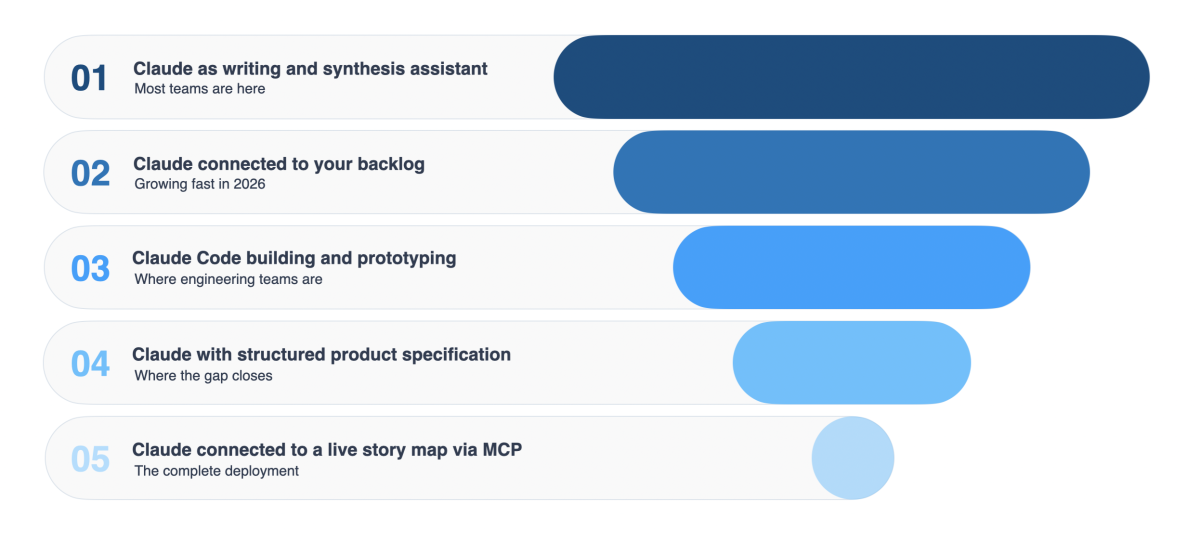
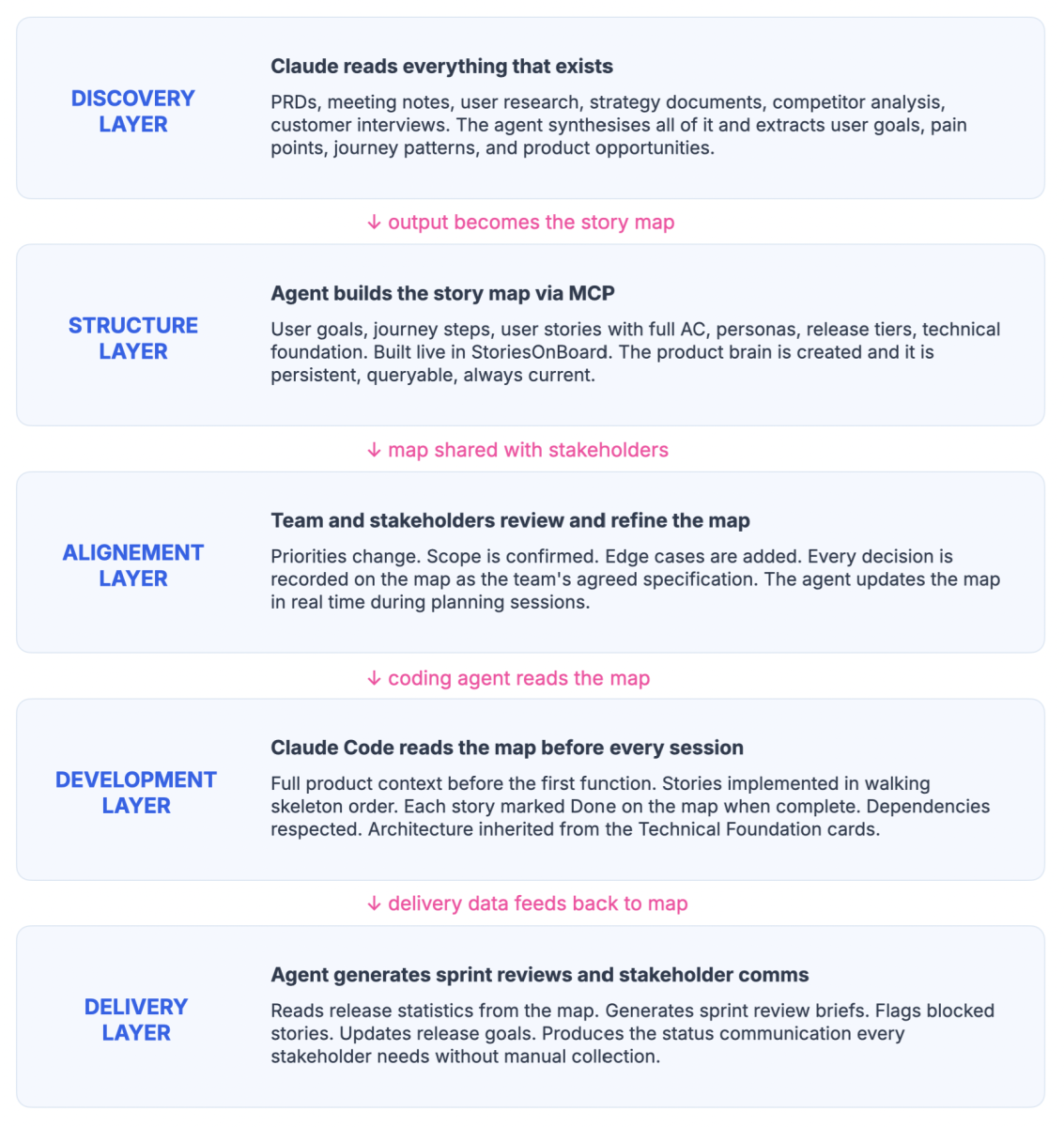
There are five levels at which Claude can participate in a product development workflow. Most teams are operating at one or two. The productivity gains are real at every level. The output quality problem when the build is fast but wrong, disconnected features, broken user journeys only gets solved at level five.
What really happens at each layer
Layer 01 : Claude as writing and synthesis assistant
Most teams are here.
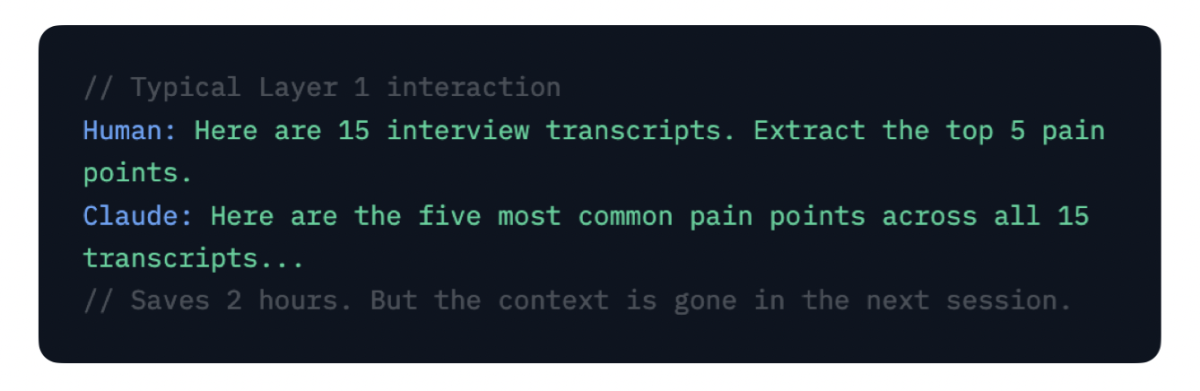
PRDs, stakeholder emails, release notes, meeting summaries, user research synthesis, competitive analysis. Claude reads what you give it and produces structured output. No integration required. High value, low setup, limited scope.
The constraint:
Claude only knows what you paste in. Every session starts from scratch. Context does not persist between conversations. The output is only as good as the input you manually provide each time.
Layer 02 : Claude connected to your backlog
This is where the most teams are growing fast in 2026.
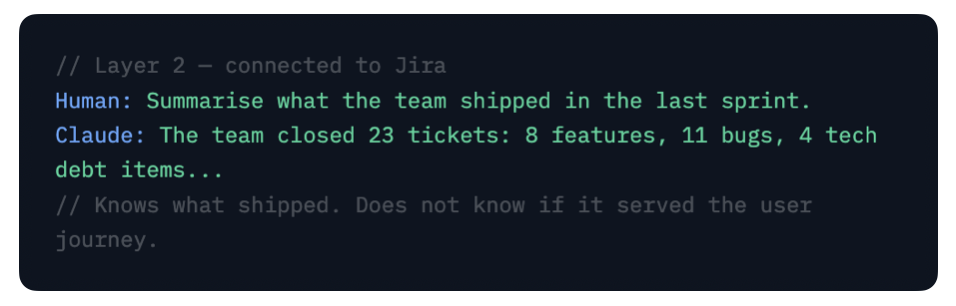
Through native connectors (Jira, Linear, Asana, ClickUp, Monday, Notion), Claude can search issues, summarize sprints, create and update tickets without you pasting anything in. This is a significant step up from Layer 01 because Claude can read the current state of work without manual input.
The constraint:
Jira holds tasks, not user journeys. Claude can tell you how many tickets are in the sprint. It cannot tell you whether the sprint is building the right user journey for the right user. Tasks without context are still just tasks.
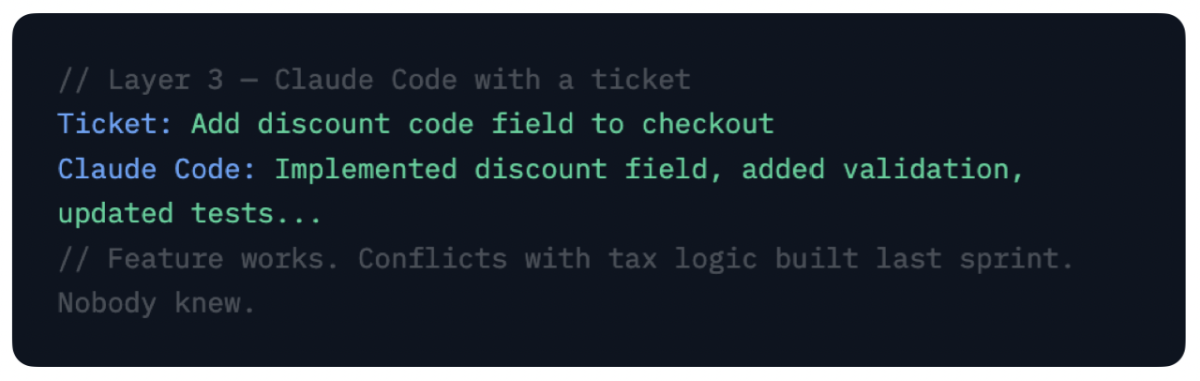
Layer 03 : Claude Code building and prototyping
This is where engineering teams are.
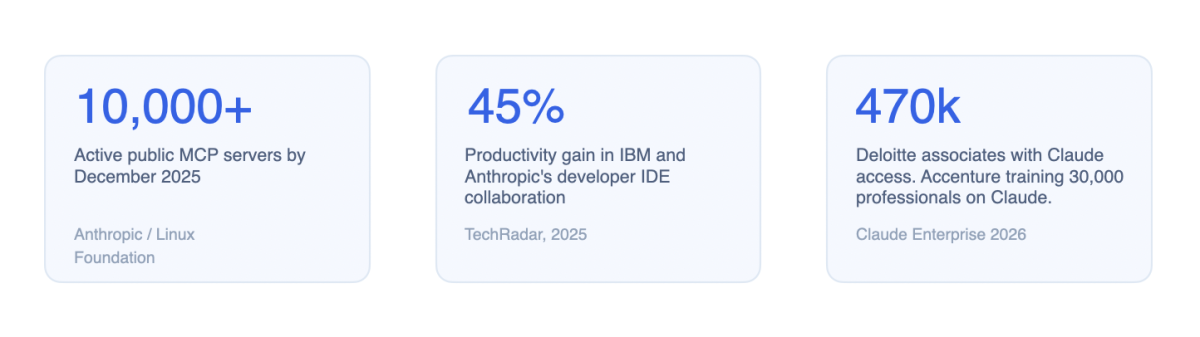
Claude Code connected to the codebase and implementing stories, writing tests, shipping PRs, refactoring, generating prototypes. IBM and Anthropic’s collaboration in late 2025 showed 45% productivity gains in developer workflows at this layer. For engineering teams this is where the speed gain is most visible and most celebrated.
The constraint:
The agent knows the codebase. It does not know the product. It implements what the ticket says. It has no model of who the user is, what they are trying to accomplish, or how this feature connects to what came before and what comes next. Fast and wring is still wrong.
Layer 04 : Claude with structured product specification
This is where the gap closes.
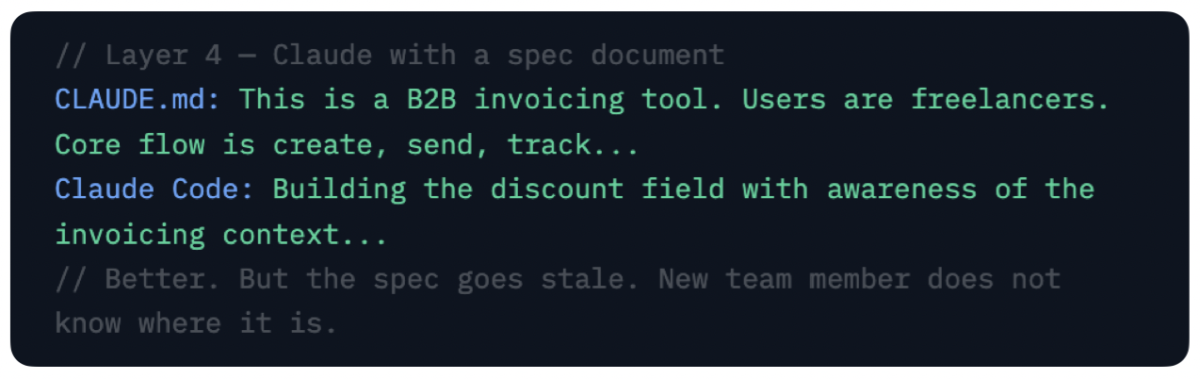
Claude reads a structured product specification before acting: a PRD, a detailed spec document, or a CLAUDE.md file that captures architectural decisions and constraints. Better than a ticket. Still not persistent across team changes, new agent sessions, or the full complexity of a multi-team product.
The improvement:
Claude builds against a fuller picture of intent.
The constraint:
The specification is a document, not a queryable model. The agent cannot ask “what is the user trying to accomplish at this step” and get a structured answer. The persona, the journey, the dependency chain are not queryable from a document.
Layer 05 : Claude connected to a live story map via MCP
This is the complete deployment stage with the ultimate product context.
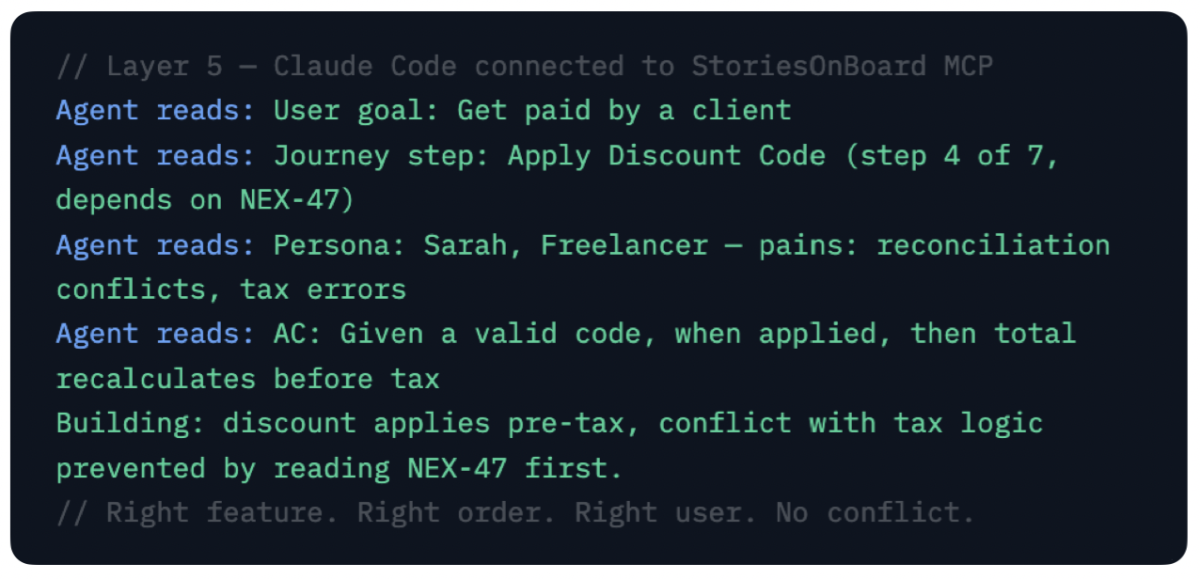
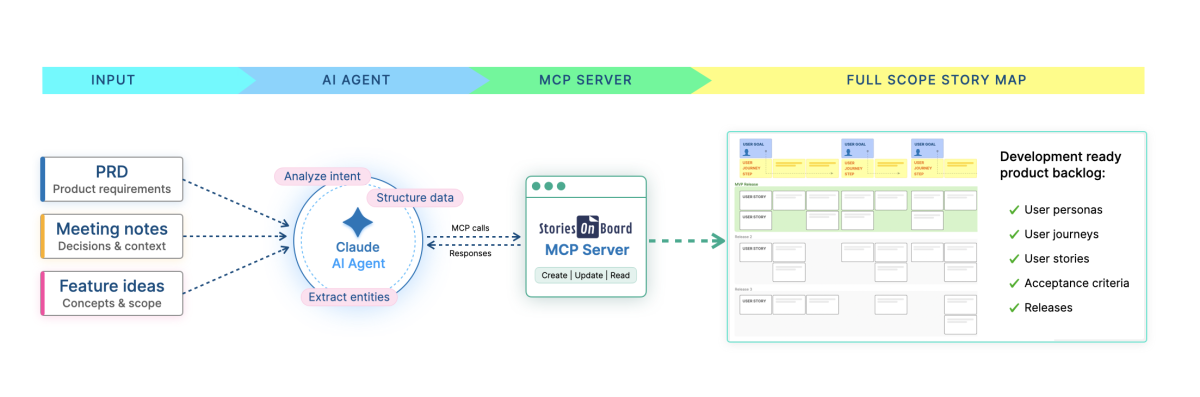
Claude reads the full product model via the MCP (Model Context Protocol) server before acting accessing user goals, journey steps, personas, acceptance criteria, priorities, dependencies, architectural decisions, and the map is readable by every agent in every session. This is qualitatively different from every layer above it.
The agent does not guess the user’s intent. It reads the persona. It does not invent the priority. It reads the release slice. It does not create conflicts. It reads the dependencies from the map. It does not start from scratch tomorrow. The map is still there, with every decision ever made on it.
What MCP is and why it changes the equation
The Model Context Protocol is an open standard created by Anthropic in November 2024 and donated to the Linux Foundation in December 2025. It is now supported by every major AI client including Claude Desktop, Claude Code, Cursor, ChatGPT, GitHub Copilot, Gemini, and Windsurf. It is not a Claude-specific feature. It is the protocol that connects AI agents to external systems.
Before MCP, connecting an AI model to an external data source required a custom integration for every combination of model and tool. Ten AI applications talking to 100 tools meant up to 1,000 bespoke integrations. MCP collapses that to a single protocol: you expose your data once through an MCP server and any MCP-compatible agent can read from it.
For product teams this means any system that exposes an MCP server becomes live context for Claude without custom code. Your Jira instance. Your GitHub repository. Your Notion wiki. Your StoriesOnBoard story map. Claude reads them all through the same protocol and synthesises them as a unified picture of the product before it acts.
The structural shift

MCP is to AI agents what HTTP was to web browsers. It is the protocol that made integration composable rather than custom. The MCP ecosystem crossed 10,000 active public servers and 97 million monthly SDK downloads by December 2025. It is not an emerging technology to evaluate. It is infrastructure that is already in production.
The implication for product development is specific: the question is no longer whether to connect Claude to your systems. The question is which system should be the primary context source the one Claude reads before everything else. A Jira board tells Claude what your team is working on. A story map tells Claude what your users are trying to accomplish, in what order, and why.
The context gap that becomes critical
Here is the honest picture of where most product teams sit in 2026. Claude knows how to write code. Claude Code knows your codebase. Jira knows your tickets. GitHub knows your commits. Notion knows your documentation. None of them know what the product is supposed to do for the user, who that user is, or how any given feature fits into the complete experience.
This is the context gap. And it is the root cause of the most common failure modes in AI-assisted product development: features built in isolation that conflict with each other, user journeys that are started but never completed, code that is correct at the function level and wrong at the product level.
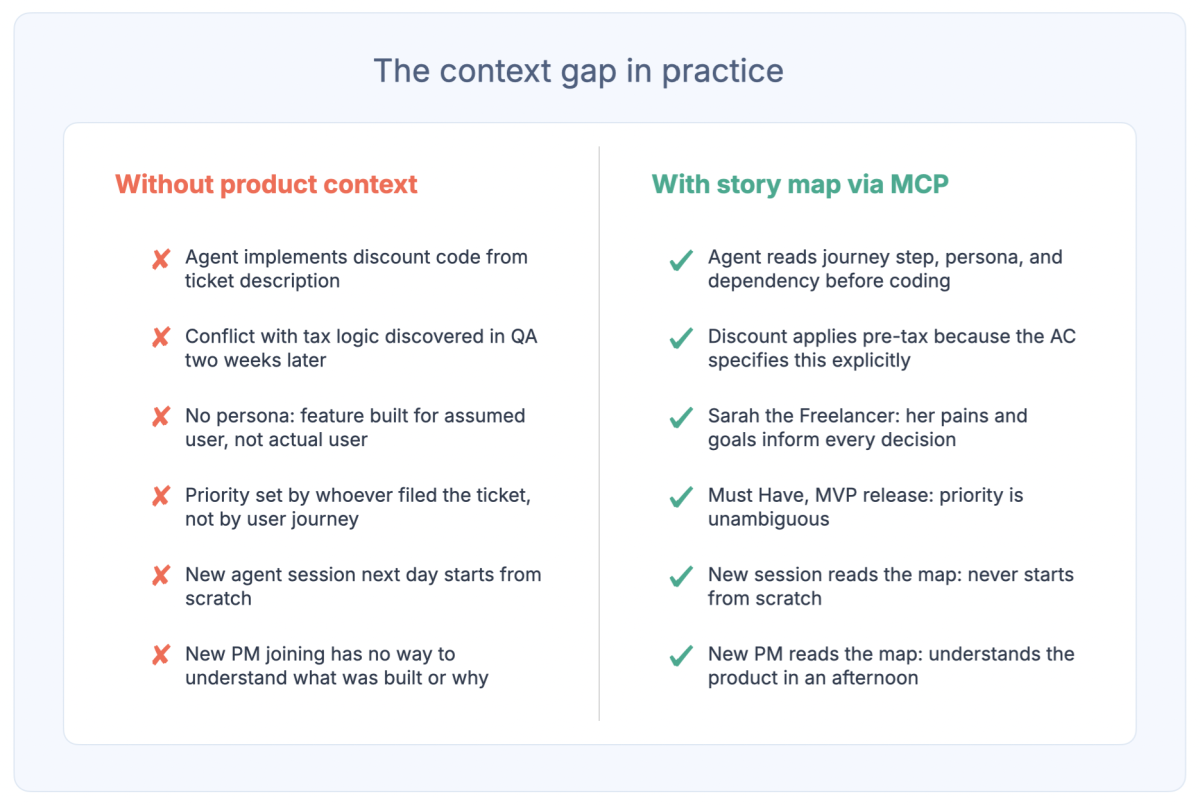
The race for the product context layer has started. A story map is structurally better suited to this role than a whiteboard, a wiki, or a ticket system. It is hierarchical by design. It is user-journey-first. It holds the three levels of context an agent needs: goals, steps, and specifications in a single queryable structure.
The story map as the product brain
A story map is a visual model of your product organised around what users are trying to accomplish. Three levels: user goals at the top (the high-level things users are trying to achieve), journey steps across the middle (the sequence of actions a user takes in order), and user stories below (the specific features and behaviours, each with acceptance criteria, personas, priorities, and dependencies).
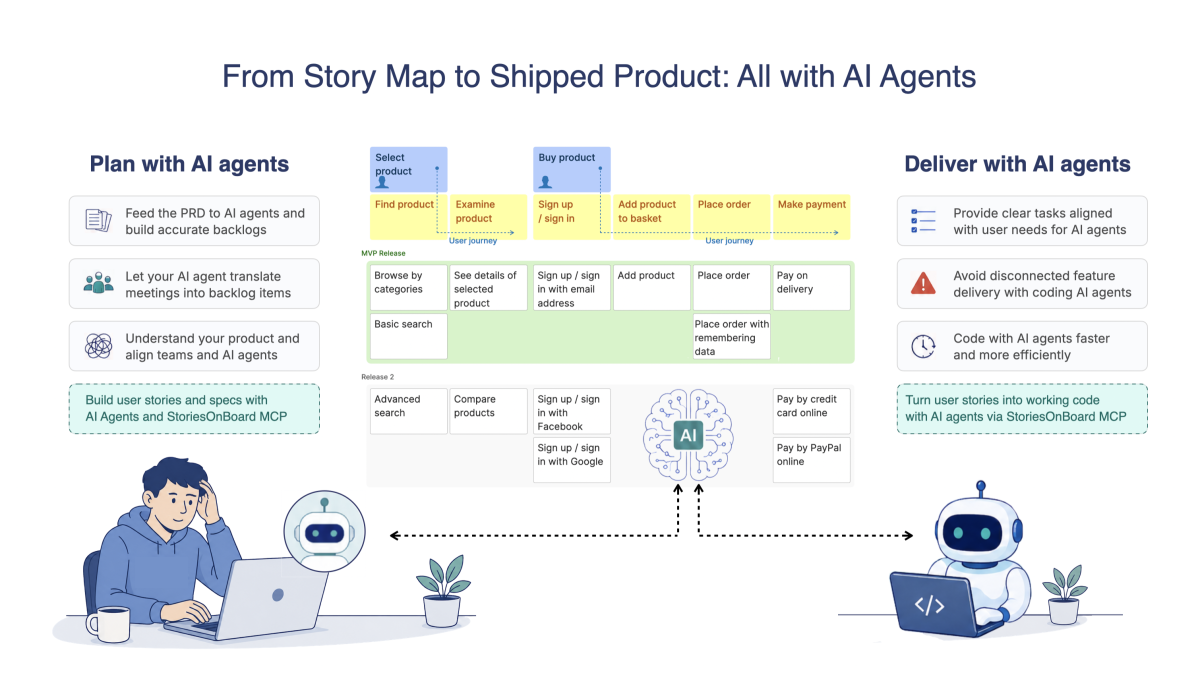
When an AI agent connects to this via MCP, something changes. The agent does not just know what to build. It knows who it is building for. It knows where in the user journey the feature sits. It knows what the user was doing in the step before and what they will do in the step after. It knows whether this is a Must Have in the MVP or a Could Have in the Intelligence tier. It knows the edge cases documented by the PM three weeks ago that are still sitting on the card.
The story map is not a document the agent consults occasionally. It is the persistent product memory that survives every context window reset, every new session, every team change, and every new agent that joins the project.
Here is a concrete example from the Nexus AI CRM project, a complete AI-ready product specification built by an agent in a single session using StoriesOnBoard MCP. 70 user stories across 14 activities. Five detailed personas. Three release tiers. A full technical foundation covering the data model, the API contracts, the authentication matrix, the event architecture, and the Definition of Done. All built by an AI agent reading a product description and writing directly to StoriesOnBoard through the MCP connection.
What the agent can read before every coding session

User goal: Capture and Qualify Leads. Journey step: Score Lead Against Qualification Criteria. Persona: Sarah, SDR — goal is to book qualified meetings, pain is spending too much time on manual research. Priority: Must Have, MVP. Effort: M (5 story points). Depends on: NEX-46 (manual lead creation). Acceptance criteria: Given a lead with enrichment data, when scoring runs, then the lead receives a score 0 to 100 and is classified as Hot, Warm, or Cold. Business rule: scoring criteria are configurable by Sales Manager without engineering support.

That is the context a coding agent reads before it writes the first function. Not a two-line ticket. The complete specification.
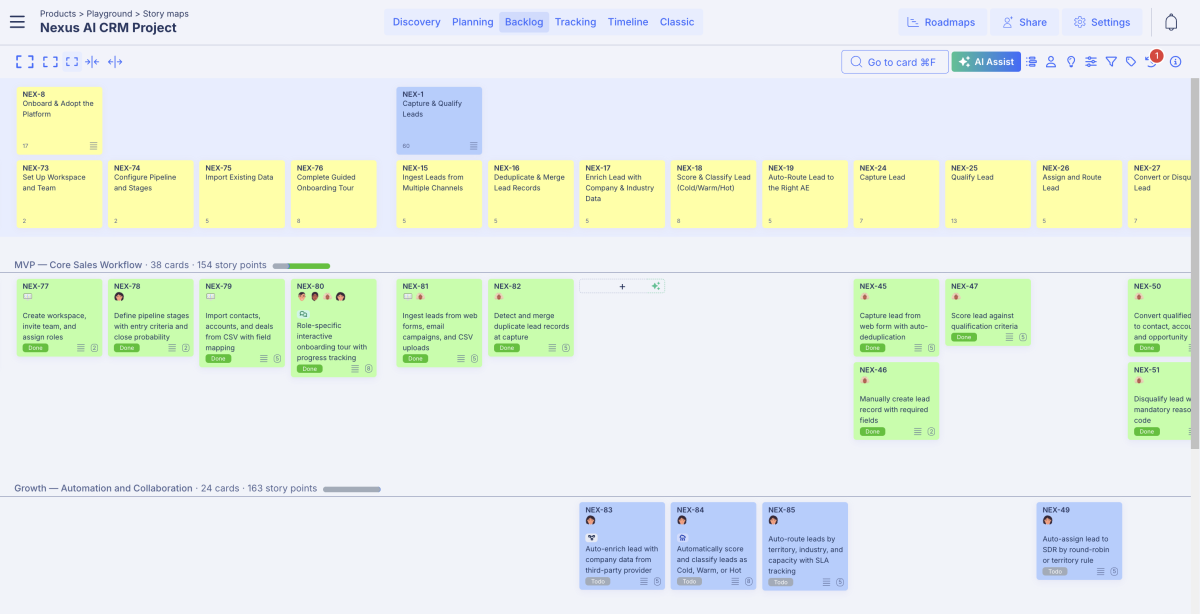
Review the Nexus AI CRM project on StoriesOnBoard live: CLICK HERE!
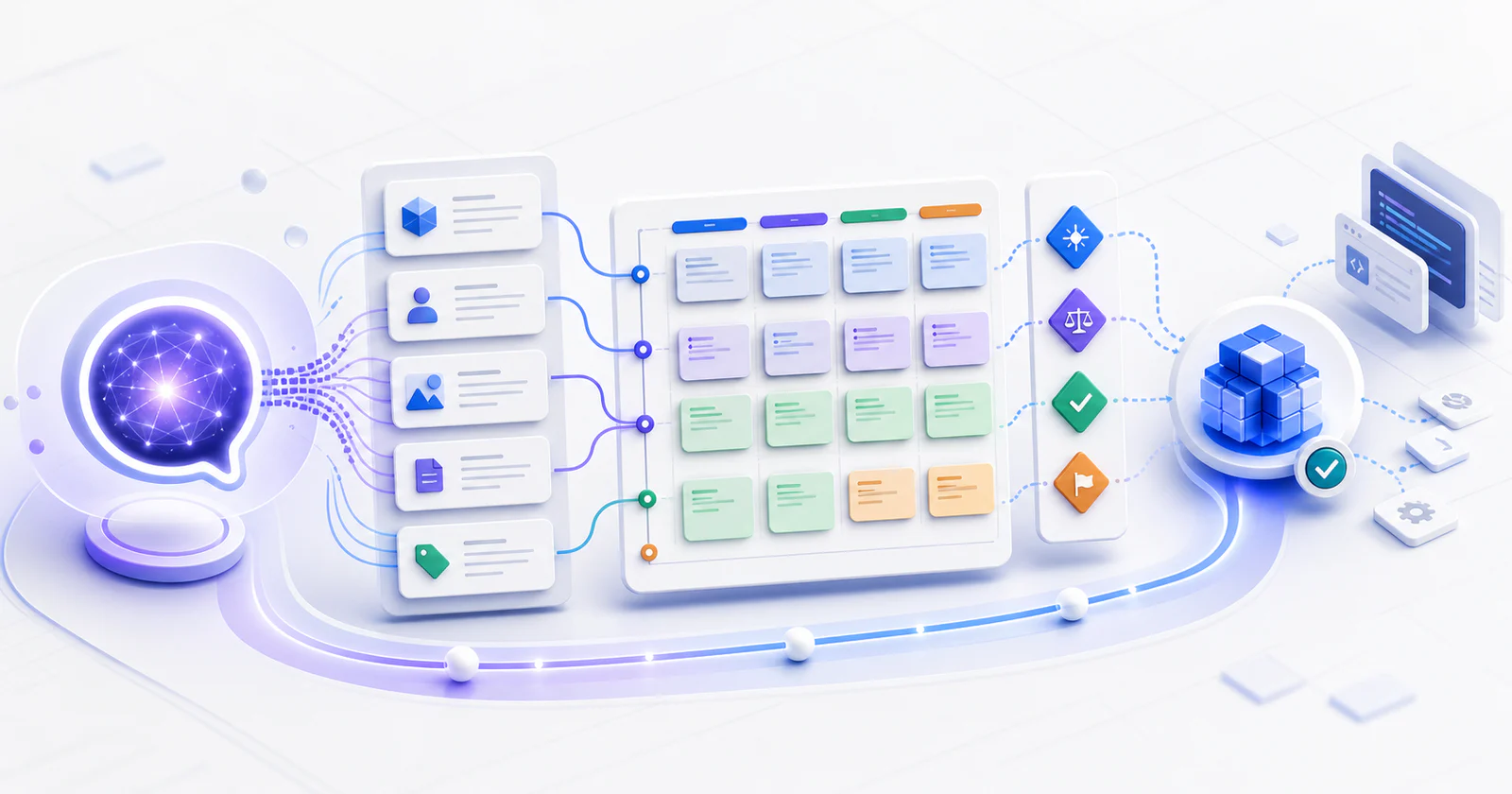
The complete deployment architecture
This is what the full Claude deployment looks like when all five layers are working together. Each layer feeds the next. The story map sits at the centre of all of them.
How to start the deployment sequence that works
The most common mistake is starting at Layer 3 or 4 because that is where the most visible speed gain appears. The right sequence starts with the map. Everything built on top of a map-connected agent is coherent. Everything built before the map exists has to be revisited.
STEP 01 : Start with the user goals, not the features
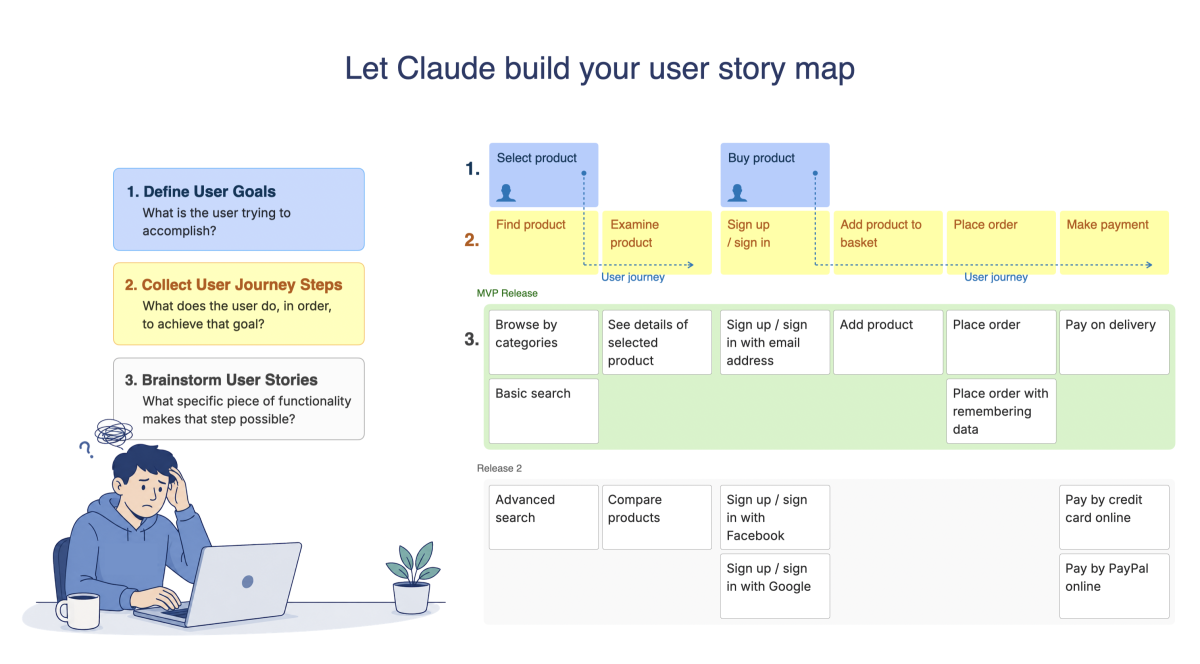
Take your best existing product description a paragraph, a slide, a PRD and ask Claude to extract the user goals from it. Not features. Goals. What is the user trying to accomplish? These become the top level of your story map. Do not move to step two until the goals feel right.
STEP 02 : Connect to StoriesOnBoard MCP and build the map live
Tell your agent to connect to StoriesOnBoard and build the story map from what it knows. Watch the user goals appear at the top, journey steps fill in across the middle, starter stories populate below. Edit what is wrong. The map is built in one session but refined over many.
STEP 03 : Add the technical foundation before any code
Create a Technical Foundation activity at position zero. Ask your agent to populate it with the technology stack decisions, the core data model, the authentication and permission matrix, and the Definition of Done. Every coding agent on every team reads these cards before writing a single line of code.
STEP 04 : Define the walking skeleton
The walking skeleton is the thinnest possible set of stories that proves the core user journey works end to end. Build these first. When they work in a deployed environment the architecture is proven and every subsequent story builds on a sound foundation.
STEP 05 : Brief every Claude Code session with “read the map first”
At the start of every development session: “Connect to StoriesOnBoard MCP. Read the Technical Foundation cards. Read the walking skeleton order. Then implement the next story.” The agent inherits the full product context before it writes anything. Not from a prompt. From the map.
STEP 06 : Mark stories Done on the map and keep it current
As stories are completed the agent marks them Done in StoriesOnBoard. As decisions change they are recorded on the relevant cards. The map is never a historical snapshot. It is the current state of the product. Every agent that reads it tomorrow works from today’s decisions.
What this looks like at enterprise scale
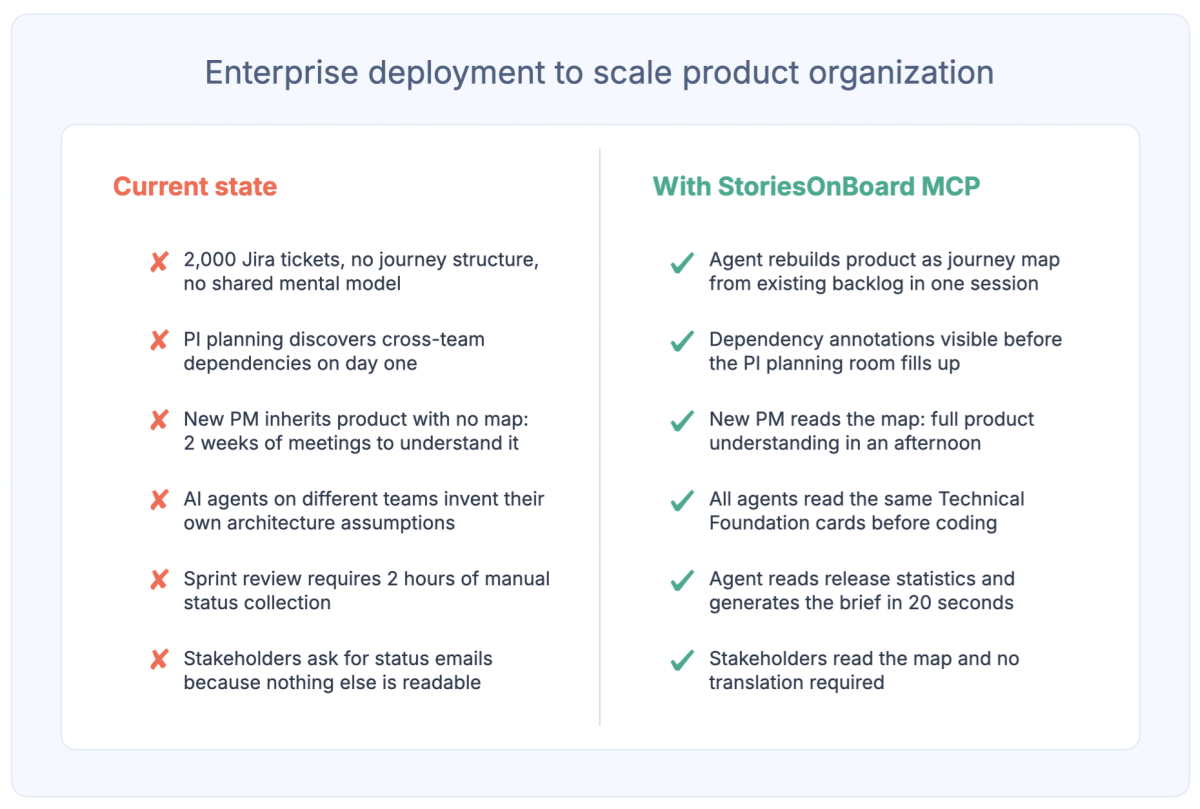
For a single product team this deployment sequence takes a day to set up and produces visible results in the first sprint. For a 500-person product organisation running SAFe, multiple release trains, and dozens of products simultaneously, the same architecture scales but with different emphasis.
At enterprise scale the map becomes the cross-team alignment layer. Dependencies between teams are visible before they are discovered in production. PI planning starts with structured dependency data rather than discovered at the end of day one. New team members onboard from the map rather than from two weeks of meetings. Every coding agent across every team reads from the same product context, which means the features they build are coherent with each other even when the teams that built them have never met.
The one question to answer before the next sprint
When your coding agent picks up the next story in your backlog, what does it know about the user that story is for? What does it know about the step before and the step after in the user journey? What does it know about the priority, the edge cases, the dependency, the persona?
If the honest answer is “not much,” the deployment is incomplete. The agent is fast. The context is missing. And fast without context is not progress. It is expensive drift.
The complete deployment with all five layers, with a live story map at the centre, connected to every agent through the MCP server is not a six-month transformation project. It is a one-session setup that produces a map your agents read forever. The Nexus AI CRM project referenced throughout this article was built in a single session: 70 stories, 5 personas, 3 release tiers, full technical foundation. One session. Every coding agent that has worked on it since has read that map before writing a single line of code.
The gap between where most teams are and what is possible is not a capability gap. Claude is already capable. It is a context gap. Close it with a story map connected via MCP and the speed you are already getting becomes the speed you actually need: fast, coherent, and building the right product for the right user.
Connect your agent to the product barin

Build your story map in StoriesOnBoard, connect Claude Code via MCP, and give your agents the product context they need before they write a single line of code.
Learn more about: