Product teams often start with a PRD and end up sorting through scattered notes, mixed interpretations, and a backlog that feels more like a dumping ground than a plan. That is exactly where an AI-driven workflow can help. Instead of manually reading every paragraph, highlighting requirements, and piecing together user flows, an AI agent can process the document, identify the main journeys, and draft a structured PRD to story map output that the team can review, refine, and use as the foundation for planning.
This is not about replacing product thinking. It is about speeding it up. A well-designed AI agent can surface the narrative already hidden in a PRD: who the users are, what they are trying to accomplish, what steps they take, and what stories belong under each step. When paired with a story mapping tool like StoriesOnBoard, the result is a more collaborative and visual way to align on what to build and why before the team starts writing tickets.
In this article, we will walk through a practical approach to turning a PRD into a story map with AI agents. You will see how to break the work into a repeatable pipeline, what the AI should extract, how to validate the output, and how StoriesOnBoard helps keep the story map as the source of truth from discovery through delivery.
Why a PRD to Story Map Workflow Matters
A PRD is usually written to explain a product problem, define goals, and describe functionality. It is useful, but it is rarely organized the same way teams build software. Engineers, designers, analysts, and product managers need to understand the sequence of user behavior, not just a list of features. That is why translating a PRD into a story map is so valuable. A story map makes the product narrative visible from end to end.
The story map structure also supports better decisions. When activities, steps, and user stories are laid out clearly, the team can see which parts are essential for an MVP and which can wait. Dependencies become visible. Gaps become easier to spot. Overly detailed requirements stand out. The team is no longer reading a document in isolation; it is discussing a shared map of user intent and delivery scope.
AI agents make this transformation faster by handling the first-pass synthesis. Rather than asking people to manually extract every requirement, the agent can read the PRD, infer the most likely activity groups, map steps in the user journey, and propose story slices that can be edited in a collaborative workspace. That means more time spent on product judgment and less time spent on transcription.
What the AI Agent Should Look For
- User types and personas mentioned in the PRD
- Goals, pain points, and success criteria
- Primary workflows and alternate paths
- Functional requirements and constraints
- Edge cases, exceptions, and dependencies
- Terms that hint at activities, steps, or user stories
These signals help the agent move beyond keyword extraction and toward actual product structure. A strong output does not just repeat the PRD. It reorganizes it into a hierarchy that supports planning and prioritization. That is the difference between summary and synthesis.
Step 1: Prepare the PRD for AI Analysis
Before the AI agent can turn a PRD into a story map, the input needs to be reasonably clean. The better the document quality, the more reliable the output. That does not mean the PRD needs to be perfect. In real life, PRDs often contain a mix of goals, assumptions, feature requests, and references to research. The point is to give the agent enough structure to work with.
Start by making sure the PRD includes a clear problem statement, target users, goals, known constraints, and any functional requirements that matter. If the document is huge, consider splitting it into sections. For example, one part may focus on onboarding, another on payments, another on notifications. AI agents perform better when they can reason over manageable chunks rather than a wall of text.
It also helps to remove duplicate language and make references explicit. If the PRD says, “the system should support this,” rewrite it to name the system behavior. If the PRD mentions a workflow from a previous project, add context. AI is good at pattern matching, but it still benefits from clear inputs. The cleaner the PRD, the better the initial story map draft.
Helpful PRD Cleanup Checklist
- Confirm the problem statement is visible near the top
- List the primary user types or personas
- Separate goals from implementation notes
- Highlight every explicit requirement
- Call out assumptions and open questions
- Group long sections by workflow or theme
Once the PRD is prepared, the AI agent can begin identifying the narrative structure hidden inside the text. This is where the transformation from document to map starts to feel useful rather than mechanical.
Step 2: Use the AI Agent to Identify User Flows
The first major job for the AI agent is to infer user flows. A PRD may describe features in a list, but story maps are built around movement: what the user does first, what comes next, and what happens when something goes wrong. The AI should scan the PRD for verbs, triggers, outcomes, and dependencies to reconstruct those flows.
For example, if a PRD describes a subscription feature, the agent might identify a flow like: discover plan, compare options, enter payment details, confirm purchase, and receive confirmation. If the document mentions fallback states, the agent should include those too. Cancelation, retries, validation errors, and alternative paths are often buried in the margins of the PRD, but they matter a lot in the story map.
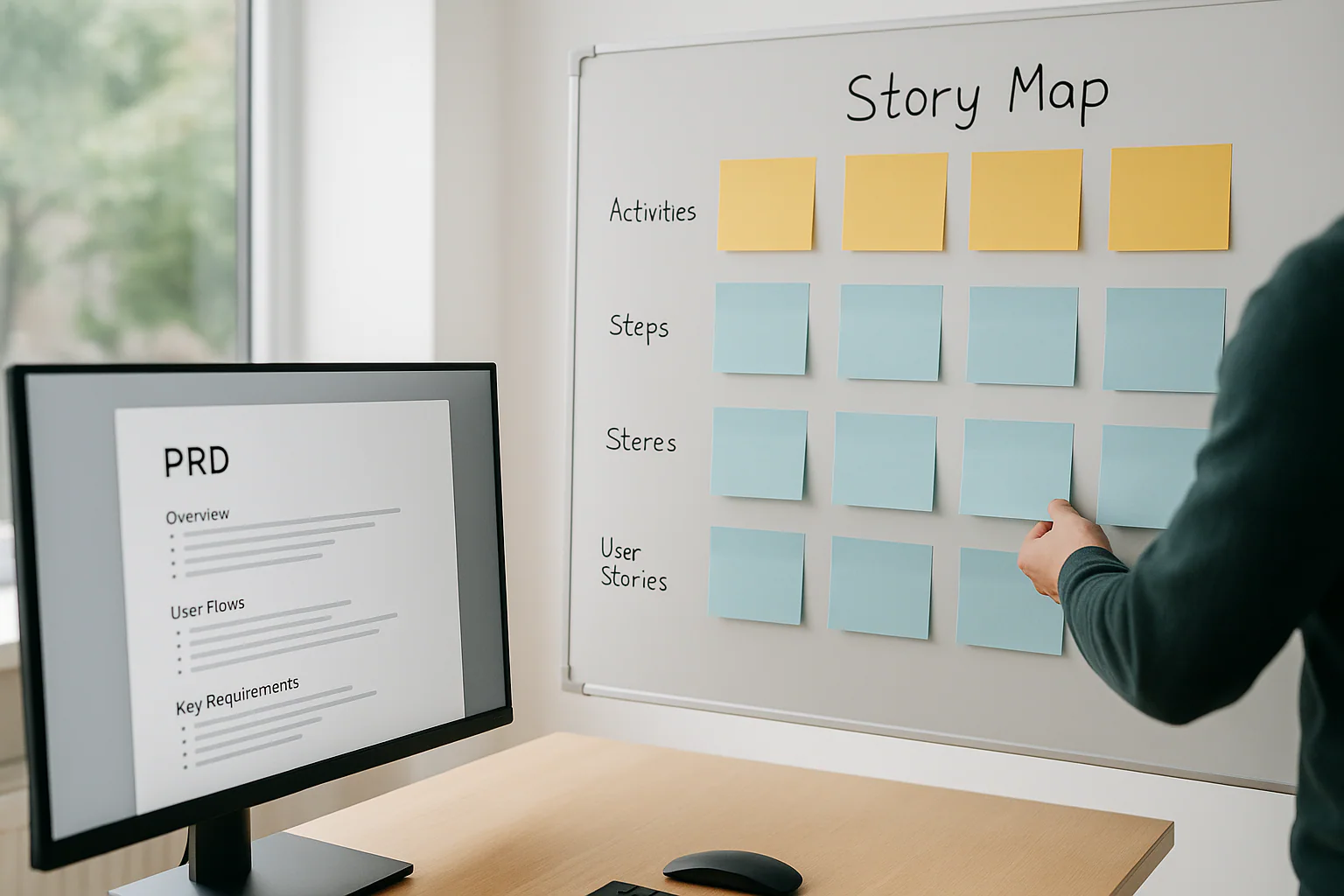
In a tool like StoriesOnBoard, those flows become the backbone of the map. Activities sit at the top, steps sit underneath, and user stories get placed beneath the relevant step. This hierarchy keeps the team focused on user intent instead of jumping straight into implementation details. It also helps teams discuss where the MVP begins and ends.
Flow Patterns an AI Agent Can Recognize
- Sequential flows, such as sign up, verify, and complete profile
- Decision-based flows, such as choose plan or skip for now
- Recovery flows, such as invalid input or failed payment
- Conditional flows, such as showing steps only for certain user roles
- Repeatable flows, such as editing, saving, and reusing content
When the AI surfaces these patterns, the team gets an immediate starting point for discussion. Instead of arguing over where to begin, the group can review the proposed flow and ask whether it matches the real user journey. That is exactly the kind of collaborative sense-making StoriesOnBoard supports well.
How to Turn a PRD to Story Map Structure
Once the AI agent has identified the likely user flows, the next step is to translate them into the story map hierarchy. This is where the work becomes concrete. A story map is not just a list of tasks. It is a structured model of user behavior organized into activities, steps, and stories.
At the top level, activities represent broad user goals. They are the “why” behind the work. Under each activity, steps describe the key stages in the user journey. These are the “how” at a high level. Finally, user stories capture the specific system behaviors or capabilities needed to support each step. These are usually the smallest slices of value that the team can deliver.
The AI agent should map the PRD content into this hierarchy with enough fidelity that the team can recognize the original intent, but also enough abstraction that the map remains usable. A good map does not mirror the PRD sentence by sentence. It turns raw requirements into a product narrative that can be prioritized and refined.
Example of Hierarchical Mapping
- Activity: Set up an account
- Steps: Enter details, verify email, choose preferences
- User stories: As a new user, I want to enter my email so that I can create an account
- User stories: As a new user, I want to verify my email so that my account is secure
- User stories: As a new user, I want to select preferences so that I can personalize my experience
This hierarchy is especially helpful when teams need to define an MVP. They can decide which stories are necessary to support the activity and which stories are enhancements. That makes backlog slicing much more intentional and much less chaotic.
Using AI Agents to Extract Key Requirements
A useful AI agent does more than create a neat outline. It should also extract key requirements from the PRD and attach them to the correct part of the story map. This is where the agent becomes a real assistant rather than a summarizer. It can identify functional rules, data needs, permissions, error states, and acceptance signals that belong in the map or in supporting notes.
For instance, if a PRD says that only admins can approve requests, the agent should associate that requirement with the approval step. If the PRD specifies that a user must receive a confirmation email within five minutes, that becomes a requirement tied to the completion step. If the PRD mentions a system limitation, the agent should preserve it so the team can discuss tradeoffs before delivery begins.
StoriesOnBoard supports this kind of structured thinking because teams can capture ideas quickly, refine them into well-formed user stories, and add acceptance criteria while still seeing the overall map. That combination matters. Requirements do not live in a vacuum; they live in context, and the map provides that context.
Requirement Types to Capture
- Functional requirements tied to user actions
- Business rules that affect behavior
- Data requirements, such as fields or records needed
- Permission rules and role-based access
- Validation and error handling rules
- Non-functional constraints that affect experience or delivery
When requirements are attached to the right stories, the team can discuss them in a more grounded way. Instead of reading a giant requirements section, they can see exactly where each rule matters. That clarity reduces rework and makes review conversations far more efficient.
How StoriesOnBoard Helps Teams Validate the AI Output
An AI-generated story map should never be treated as final without human review. The real value comes from the combination of machine speed and human judgment. StoriesOnBoard is designed for that collaborative validation step. Product managers, UX designers, and delivery teams can open the map, inspect the hierarchy, and make edits in a shared workspace.
Live presence indicators make it easy to see who is working on the map. A modern visual text editor helps the team refine story wording without losing momentum. Built-in AI features can assist with rewriting user stories, drafting acceptance criteria, and polishing product text. That means the team can move from raw output to a refined plan without switching tools every few minutes.
Validation is where the map becomes trustworthy. The team can ask whether the proposed activities match the product goals, whether the steps reflect real user behavior, and whether the user stories are sliced in a way that supports delivery. If something is missing, the team can add it. If something is too detailed, they can simplify it. The AI draft is the beginning of the conversation, not the end.
Questions to Ask During Review
- Does this activity reflect a meaningful user goal?
- Are the steps in the right order?
- Did the AI miss any alternative or exception paths?
- Are the user stories small enough to build and test?
- Do the requirements align with business priorities?
- What belongs in the MVP versus a later release?
These questions turn the AI-generated map into a living artifact. The team can use it in discovery, kickoff, refinement, and planning sessions without losing the broader narrative. That is a major advantage over a static PRD or a backlog spreadsheet.
Building a Repeatable AI Agent Workflow
If you only use an AI agent once, you will get a speed boost. If you build a repeatable workflow, you will get a process improvement. The best teams treat the PRD-to-map transformation as a system. They define inputs, prompts, validation steps, and output formats so the process can be used consistently across projects.
A simple workflow might look like this: upload or paste the PRD, ask the AI agent to identify personas and core goals, generate candidate activities, expand each activity into steps, extract user stories and key requirements, then review the output in StoriesOnBoard. After that, the team refines the map, prioritizes slices, and exports or syncs delivery work into engineering tools when ready.
The workflow is powerful because it keeps the story map at the center. That means the team is not creating documentation for its own sake. It is building a shared understanding that can guide discovery and execution. And because StoriesOnBoard connects with delivery tools like GitHub, teams can bridge planning and engineering without abandoning the map as the source of truth.
A Practical Prompt Structure for AI Agents
- Summarize the product goal and target users
- Identify the main user journeys described in the PRD
- Group journeys into story map activities
- Break each journey into steps in the order users perform them
- Write user stories for each step with clear value statements
- Extract requirements, rules, and edge cases for each story
This approach keeps the output predictable. It also makes the AI easier to improve over time. If the team notices that the agent consistently misses a type of requirement, the prompt can be adjusted. If the map is too granular, the instructions can be refined. Over time, the workflow gets sharper and more reliable.
Where AI Helps Most and Where Humans Still Matter
AI is especially good at first-pass organization, language normalization, and pattern detection. It can scan long documents quickly and propose a rational structure in seconds. That makes it valuable for early discovery, especially when the team is under pressure to make sense of a large PRD before a workshop or planning session.
But humans are still essential for judgment. AI does not know which requirement is strategic, which edge case is likely, or which feature should be deferred because it adds complexity without enough value. Product managers and cross-functional teams bring context, experience, and accountability. They decide whether the map reflects the reality of the market and the product.
The strongest process combines both. Let AI do the heavy lifting of drafting, clustering, and extracting. Let the team do the thinking, debate, and prioritization. In StoriesOnBoard, that balance works well because the map is visual, editable, and collaborative. People can see the whole picture while still drilling into details where needed.
Practical Tips for Better PRD to Story Map Results
If you want better output from an AI agent, a few practical habits go a long way. First, write PRDs with user behavior in mind. The more the document describes what users are trying to accomplish, the easier it is for the AI to infer activities and steps. Second, use consistent terminology. If the same concept appears under three different names, the agent may split it incorrectly.
Third, review the first draft with the team quickly. The longer a draft sits unchallenged, the more likely people are to treat it as authoritative even when it contains gaps. Fourth, use the map to force decisions about scope. When stories are grouped under activities and steps, it becomes much easier to identify the slice that actually belongs in the MVP.
Finally, keep the map alive. A story map should evolve as learning grows. Discovery findings, stakeholder feedback, and technical constraints will all change the shape of the work. If the map lives in a flexible environment like StoriesOnBoard, it can remain current instead of becoming another outdated artifact.
Common Mistakes to Avoid
How AI Prompts and Context Improve the Map
One of the biggest differences between a useful draft and a noisy one is the quality of the instructions you give the agent. Clear prompt structure, document context, and explicit output expectations help the AI separate goals, flows, and edge cases instead of blending them together.
If you want to go deeper on this topic, see instructions for a practical look at why agent guidance shapes output quality.
- Feeding the AI an unstructured wall of text
- Accepting the first draft without review
- Turning requirements directly into tickets without mapping the user journey
- Ignoring alternate paths and exception handling
- Letting the story map drift away from the PRD goals
A little discipline makes a big difference. With the right inputs and review habits, the AI agent becomes a force multiplier rather than a black box.
Why StoriesOnBoard Is a Strong Fit for This Workflow
Why Story Maps Make AI Output Easier to Trust
When AI turns a PRD into a first draft, the story map gives teams a visible structure for checking whether the output really matches the product intent. That makes it easier to spot missing flows, oversized stories, or assumptions that should be challenged before planning begins.
For a broader view of how story maps help AI-driven work stay grounded, read about story map workflows in agentic product planning.
StoriesOnBoard is built for the exact moment when a PRD needs to become something more actionable. Product managers, product owners, UX, and delivery teams use it to align on what to build and why before tickets are created. The platform’s story mapping structure naturally supports the transformation from activity to step to user story, which is the core of the PRD to story map process.
Because the tool is web-based and collaborative, teams can run discovery and kickoff workshops in one place. Ideas can be captured quickly, reorganized into a map, and refined into well-formed user stories with acceptance criteria. If the team needs to prioritize the backlog or maintain shared understanding across stakeholders, they can do that without losing the big picture.
The connection to GitHub is also useful for teams that want to bridge planning and engineering execution. The story map stays as the central product narrative while delivery work moves forward in sync. That reduces the chance of losing context when tickets are created and helps prevent the common problem of shipping work that no longer reflects the original user intent.
Summary
Turning a PRD into a story map with AI agents is a practical way to move from dense documentation to a clearer, more collaborative product plan. The AI can help identify users, journeys, requirements, and edge cases, while the team provides the judgment needed to validate and refine the result. Used well, this approach saves time and improves alignment without cutting product thinking out of the process.
StoriesOnBoard gives teams a place to review, edit, and evolve that AI-generated draft into a story map they can actually use. It keeps the conversation focused on user value, delivery scope, and shared understanding. If your team is looking for a better way to turn a PRD to story map workflow into something repeatable, this is a strong place to start.
FAQ: Turning a PRD into a Story Map with AI Agents
Why convert a PRD into a story map?
A story map reveals the end-to-end user narrative instead of a flat feature list. It makes dependencies, gaps, and MVP scope visible so teams align on what to build and why.
What does the AI need from my PRD to work well?
Provide a clear problem statement, target users, goals, constraints, and key functional requirements. Clean up duplicates, add missing context, and split very large PRDs into manageable sections.
How does the AI infer user flows and edge cases?
It scans for verbs, triggers, outcomes, and dependencies to reconstruct journeys. It recognizes sequential, decision-based, recovery, conditional, and repeatable patterns, including alternate paths and errors.
Is the AI output production-ready?
No—treat it as a first-pass synthesis. Human review provides judgment, prioritization, and context before the map becomes the source of truth.
How do we validate and refine the map in StoriesOnBoard?
Open the map collaboratively, inspect activities, steps, and stories, and apply the review questions from the article. Use built-in AI to rewrite stories and draft acceptance criteria, then adjust the hierarchy and scope together.
How does this approach help define the MVP?
Organizing activities, steps, and stories makes essential slices obvious. The team can separate must-haves from enhancements and surface dependencies that affect early delivery.
Can the agent extract and attach requirements correctly?
Yes, it can pull functional rules, business rules, data needs, permissions, validations, errors, and non-functional constraints. These are linked to the relevant steps or stories for grounded discussion.
What prompt structure improves results?
Guide the agent to summarize goals and users, identify journeys, group them into activities, break them into ordered steps, write value-focused stories, and extract requirements and edge cases. Keep prompts consistent and refine them if the AI misses patterns.
How should we handle messy or very long PRDs?
Group content by workflow or theme and make references explicit so the AI has structure to reason over. Smaller, clearer chunks lead to a stronger initial map and less rework.
How does this workflow connect to delivery tools?
StoriesOnBoard connects with GitHub so delivery work stays in sync while the story map remains the central product narrative. This reduces context loss when tickets are created.