Most product teams say they value clear user stories. Then the backlog grows and reality sets in: some items use the classic As a user frame, some are vague feature labels, and some are cryptic one-liners only the author can parse. The impact is not dramatic. It is worse: slow, irritating, and constant.
That is why user story format automation matters. It is a small, practical way to remove recurring friction without asking the team to spend yet another hour tidying titles that should have been consistent from the start. In a StoriesOnBoard story map—where user goals, steps, and stories live in a shared structure—this cleanup pays off even more because the quality of the map sets the tone for every refinement session that follows.
When the story map reads cleanly, the conversation shifts. Instead of debating what a title means, the team can focus on the real questions: should this be built, how should it be sliced, and what outcome does it support? That is a far better use of everyone’s attention.
The problem nobody fixes
Almost every team agrees on the principle. User stories should follow a format, describe a person, a need, and ideally a reason. In practice, the backlog turns into a grab bag. One contributor writes a proper story. Another adds a feature description. Someone else logs a task-like title in a hurry. Over time, the inconsistency starts to feel normal.
The tricky part is that it never looks urgent enough to prioritize. No one files a blocker because of messy story titles. There is no incident to escalate. Yet the friction is real. Refinement drags because half the stories need translation before they can be estimated. New teammates hesitate because the backlog reads like a private notebook rather than a shared product map. Even senior PMs end up interpreting titles instead of shaping the roadmap.
In StoriesOnBoard, this stands out because the map is visual and hierarchical. You can immediately spot a user goal, step, or story that breaks the pattern around it. That visibility is useful—and it also means inconsistency is impossible to ignore. The problem does not go away. It just waits at the edge of every planning session.
What inconsistency actually costs
- Extra time spent unpacking titles during refinement
- Slower estimation because the team lacks a shared read of each item
- Lower confidence for new contributors learning the structure
- More rework when notes are translated into tickets
- A backlog that looks maintained but is not truly curated
None of those costs is severe alone. Together, they add up to a background tax on momentum. That tax is why messy story titles keep returning.
Why it doesn’t get fixed manually
Manual cleanup sounds simple until you try it. Imagine a story map with 80 subtasks. Some are already fine. Some are close. Some need a full rewrite. A few are not user stories at all. And a handful are tied to delivery integrations or external cards that should not be touched.
Doing it properly takes focus. You have to read each title, infer the meaning, decide whether it meets the convention, and rewrite only where appropriate. It is not hard work—it is tedious work. It feels like administrative overhead, so it gets bumped for tasks that seem more important in the moment.
Then the next sprint begins and the pattern repeats. Someone adds a new card. Another teammate uses a shorthand title. A third edits from their own perspective and forgets the team convention. Without a lightweight system to keep it in shape, the backlog slowly drifts back into inconsistency.
This is exactly the kind of task that benefits from user story format automation.
The work is repetitive, rule-based, and easy to review, which makes it a great fit for an AI-assisted workflow with human approval. The goal is not to hand control away; it is to remove the dull part while preserving judgment where judgment matters.
What the skill does — step by step
The workflow is deliberately simple. It does not try to understand your entire product. It does one thing well: scan a story map, check which subtasks follow the team’s story format, propose rewrites for those that do not, and wait for approval before changing anything.
That structure matters. In StoriesOnBoard, the story map remains the source of truth. The skill works on top of it, not around it—reading current content, respecting the hierarchy, and leaving activity or task titles untouched. In short, it helps the map become more consistent without quietly reshaping how the team thinks about the work.
The workflow in plain language
- The agent fetches all subtasks from the story map.
- It classifies each title into one of four buckets: correct, partial, not a story, or integration-linked.
- It detects whether the team uses English or Hungarian story format based on existing cards.
- It presents a full classification report with a proposed rewrite for each non-conforming title.
- The PM reviews the suggestions and approves all, some, or none.
- The agent applies only the approved rewrites.
That sequence may sound obvious, but it is what makes the skill trustworthy. It does not begin by changing content. It starts by understanding what it sees and showing its reasoning in a way a product manager can actually review.
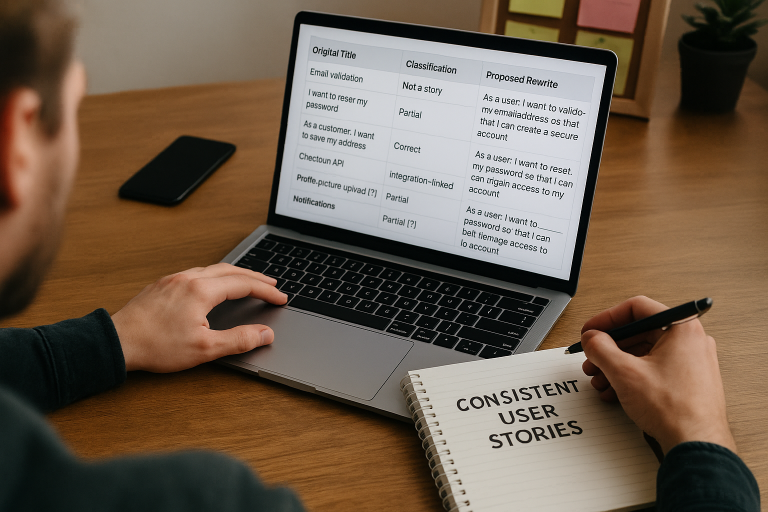
Here is what that review can look like in practice. The exact wording will vary by team, but the pattern is consistent.
| Original title | Classification | Proposed rewrite |
|---|---|---|
| Email validation | Not a story | As a user, I want to validate my email address so that I can create a secure account. |
| I want to reset my password | Partial | As a user, I want to reset my password so that I can regain access to my account. |
| As a customer, I want to save my address | Correct | No change |
| Checkout API | Integration-linked | Skipped |
| Profile picture upload [?] | Partial | As a user, I want to upload a profile picture [?] so that I can personalize my account. |
| Notifications | Not a story | As a user, I want to manage notifications so that I can control how I receive updates. |
Notice what is happening here. The agent is not trying to make the backlog clever or verbose. It is making each title fit the team’s chosen structure so the map reads consistently across contributors. That consistency is the product.
The rules the agent follows when rewriting
Trust comes from constraints. If an AI tool rewrites too freely, it becomes a liability. That is why this skill follows tight rules. It is designed to improve clarity, not invent new meaning.
The agent infers the user role from the parent task and surrounding activity context. If the broader map suggests a shopper, patient, administrator, or team member, the rewrite reflects that context. If it cannot infer the role confidently, it does not guess. It marks the item with a [?] so a human can decide.
It also limits itself to subtasks. Activity or task titles are never changed. That matters in a story map because higher-level items often carry strategic or structural meaning that must be preserved. The agent leaves those anchors alone and focuses on the smaller story-level items where format drift usually happens.
Rewrite rules that protect meaning
- Do not invent a new user intent if the original is unclear.
- Match the team’s existing language pattern when rewriting.
- Only add a
so thatclause when the benefit is reasonably inferable. - Flag uncertain rewrites with
[?]for manual follow-up. - Never touch activity or task titles.
- Always skip integration-linked cards.
This approach matters because good product teams want consistency without distortion. A rewrite that looks polished but shifts meaning is worse than a messy title. The skill must preserve the original intent, even when the original wording is rough.
In StoriesOnBoard, that restraint aligns with how teams already work. The story map supports discovery and alignment before tickets are created. A smart rewrite workflow should help teams keep the narrative clean while staying faithful to the source ideas captured in workshops, brainstorming, or collaborative backlog shaping.
What the PM sees before anything changes
The review step is critical. The PM does not need to trust the agent blindly. First, the agent produces a classification report showing which items are compliant, partial, not stories, or integration-linked (and therefore skipped).
This is where the human stays in control. The PM can approve every suggestion, accept only the obvious ones, or reject the batch. That flexibility matters because backlogs need different levels of intervention. Some teams want a clean sweep. Others want a careful partial cleanup before planning. The skill supports both.
And because the agent shows the rewrite before applying it, the PM can catch a bad assumption early. If a story says “Notifications” and the intended role is an admin rather than a user, the review makes that visible. If a title is ambiguous, the [?] marker keeps the uncertainty explicit instead of hiding it in a polished but inaccurate rewrite.
That is a subtle but important point. Automation should not make teams less thoughtful. It should make the thinking cheaper and more scalable.
Why this works especially well in StoriesOnBoard
StoriesOnBoard is built around story maps, shared understanding, and structured backlog preparation—making it a natural fit for targeted automation like this. When teams shape user goals, activities, steps, and user stories together, they are already working in a format where consistency matters. A small cleanup tool can create an outsized improvement in day-to-day work.
Because StoriesOnBoard supports live collaboration, teams often add and edit items quickly during workshops or remote sessions. That speed accelerates discovery and also raises the odds of messy titles. A skill like this restores order after the workshop without forcing the team to manually audit every card.
It also fits the broader product flow. Teams capture ideas in StoriesOnBoard, refine them into clear stories and acceptance criteria, and then sync selected work to delivery tools like GitHub. If the source stories are inconsistent, that inconsistency follows downstream. Cleaner titles at the map level mean a cleaner handoff to engineering.
In that sense, user story format automation is not just about style. It helps keep the story map a reliable source of truth from discovery through execution.
What you’re left with after one run
After a single run, the difference is obvious. The story map is cleaner. Every subtask title follows the same format. The PM has reviewed each proposed rewrite before anything was applied. Nothing changed silently. Integration-linked items were skipped. Higher-level cards remained intact. Ambiguous titles are clearly flagged instead of guessed at.
The best part is what happens next. The next refinement session starts from a stronger baseline. The team stops wasting time translating half-formed titles into readable stories. Estimation speeds up because everyone is looking at the same structure. New contributors learn the pattern by example. The backlog feels managed rather than merely accumulated.
The outcome may sound modest, but product work is full of small improvements that compound. A clearer backlog lowers cognitive load. Lower cognitive load improves conversation quality. Better conversations lead to better slicing, better estimation, and better decisions about what belongs in the MVP.
The practical benefits after cleanup
- Consistent story titles across the map
- Faster refinement sessions
- Fewer wording debates
- Clearer onboarding for new contributors
- A shorter list of truly ambiguous items to resolve by hand
The point is not perfection. It is a cleaner starting point—which is usually what teams need most.
The broader point behind user story format automation
Format QA is a small capability with outsized impact. It may not sound flashy compared with bigger AI features, but it solves a problem backlog-heavy teams recognize immediately. More importantly, it shows what well-scoped agent skills should look like in product work.
A good agent skill is not a vague assistant that tries to do everything. It is a focused workflow that handles one recurring task reliably, explains its reasoning, and waits for approval before anything irreversible happens. That combination respects both speed and accountability.
Once a team sees this work on user story formatting, it is easy to imagine adjacent skills: acceptance criteria cleanup, duplicate story detection, inconsistent label normalization, or backlog hygiene checks before release planning. The pattern is the same. Pick a narrow workflow. Define the rules. Keep human review in place. Let the agent handle the repetitive part.
That is also why StoriesOnBoard is a useful place to apply these ideas.
Its visual hierarchy makes the backlog legible, its collaborative workflow makes review practical, and its AI capabilities can assist without taking over the product owner’s role. The platform is designed for alignment, and alignment depends on clarity. Clean story titles may seem small, but they are part of that clarity.
Summary
Inconsistent story titles slow teams down in quiet ways. They make refinement longer, estimation murkier, and onboarding harder. Manual cleanup is tedious, so it rarely gets sustained attention. A focused workflow built around user story format automation solves that by scanning a StoriesOnBoard story map, classifying subtasks, proposing safe rewrites, and applying only approved changes.
The value is not just cleaner wording. It is a better baseline for the next conversation, the next workshop, and the next sprint. When the story map is consistent, the team can spend more time deciding what to build and why—and less time decoding messy titles.
FAQ: User Story Format Automation in StoriesOnBoard
What problem does this automation solve?
It fixes inconsistent user story titles that slow refinement and estimation. By making titles follow a clear pattern, the team spends less time decoding and more time deciding what to build.
How does the workflow operate?
The agent fetches subtasks, classifies each title, detects English or Hungarian format, and proposes rewrites. A PM reviews a full report, approves selections, and only approved changes are applied.
What items are never changed?
Activity or task titles are never touched, and integration-linked cards are always skipped. The skill works only on subtasks where format drift usually happens.
How is meaning preserved during rewrites?
The agent infers roles from context, uses the team’s language, and adds a benefit clause only when it’s reasonable. If unsure, it flags items with [?] instead of inventing intent.
Who stays in control of changes?
The product manager reviews a classification report before anything changes. They can approve all, some, or none of the suggested rewrites.
Which languages are supported?
The agent detects whether the team uses English or Hungarian story format based on existing cards. It then rewrites accordingly while keeping the team’s phrasing.
How does this improve refinement and estimation?
Cleaner, consistent titles reduce clarification time and speed up estimation. New contributors onboard faster because the map reads like a shared product narrative.
Will it change how we structure the story map?
No. It works on top of your map, respects hierarchy, and treats the story map as the source of truth while improving consistency at the subtask level.
What happens to ambiguous or non-story titles?
Non-stories are classified and given a proposed user-story rewrite. Ambiguous cases are flagged with [?] for human follow-up; integration-linked items are skipped.