A manager approves an expense. The employee sees “payment failed” and tries again. Finance later finds two payouts. The original request succeeded; the confirmation arrived after the app stopped waiting.
This is an illustrative scenario, but it exposes a useful planning question: what should the product do when it cannot yet tell the user what happened?
Finance app requirements need to cover access, permissions, transaction states, retries, data freshness, reconciliation, corrections, money and dates, notifications, and operational history. Start with the user journey, then ask what happens when an action is delayed, denied, repeated, or corrected. These ten areas form a planning checklist, not a ranked study of how often teams miss them.
We will use an illustrative expense reimbursement app throughout. The three participants are an employee submitting a claim, a manager reviewing it, and a finance operator resolving payment exceptions. The goal is to produce a reviewable story map and testable stories before implementation.
Define the financial job before choosing features
“Finance app” describes very different products. A budget tracker reads transactions; a payment app initiates money movement. A reporting tool may never do either. Identify what your app can change and which external record confirms the result.
| Product | Questions to emphasize |
|---|---|
| Budget tracker | Bank reconnection, pending transactions, duplicate imports, recategorization, and stale balances. |
| Invoicing or expenses | Approval authority, corrections, partial payment, overdue work, and accounting exports. |
| Payments | Authorization, uncertain outcomes, duplicate prevention, reversals, and settlement evidence. |
| Investment analytics | Data timestamps, currency, fees, return assumptions, and the difference between historical results and projections. |
Record applicable identity, retention, security, and regulatory decisions with the people responsible for them. A read-only calculator and a money-transfer service should not inherit the same checklist without review.
Ten requirements to put back into the story map
Each example below is a proposed requirement for our reimbursement scenario. Adapt the business rules before using it. The acceptance checks illustrate observable behavior; they are not a complete test plan.
1. Recover access without losing control of the account
An employee changes phones while a claim is awaiting approval. Password reset alone may not restore their second factor or organization access. Map recovery through returning to permitted work, including escalation when self-service cannot finish.
Story: As an employee, I want an approved recovery route so I can regain access to my claims.
Acceptance check: An expired recovery link offers a new request without granting access; successful recovery restores only the user's current permissions. Decide separately what happens to existing sessions.
Reuse the journey structure from our common app feature story map library, then add the identity decisions specific to this product.
2. Separate viewing, editing, approving, and paying
“Admin” is too broad to explain who may reimburse whom. Our example policy prevents employees from approving their own claims. It also needs a replacement approver when a manager leaves.
Story: As a finance operator, I want claims routed to an eligible reviewer so work continues when responsibilities change.
Acceptance check: A claimant cannot approve their own request, including through a direct request. Reassignment records the old and new reviewer without granting the replacement unrelated access.
Put these stories under “Review a claim.” Keep the policy decision with the card rather than hiding it in a general permissions ticket.
3. Define states beyond success and failure
Approved, submitted for payment, and paid describe different events. An uncertain provider response needs its own handling. Specify who can act in each state and what evidence permits a transition.
Story: As an employee, I want to distinguish approval from payment so I know whether reimbursement is complete.
Acceptance check: Approval alone never displays “Paid.” An unresolved payment displays a pending confirmation state and its last checked time.
Provider models differ. For example, Plaid represents a pending-to-posted transaction transition by removing the pending item and adding a posted item, with a linking identifier when available. A budgeting app must account for that when preserving user categories or notes.
4. Make retry behavior part of the user story
A disabled button helps with double-clicks but does not resolve a lost response or repeated server event. Ask whether a retry continues the original operation or starts a new one.
Story: As a finance operator, I want to resume an uncertain payout without paying the same claim twice.
Acceptance check: Repeating the same payment instruction after a timeout does not create a second payout. The operator can inspect the original operation's status.
Stripe's idempotent request mechanism provides a concrete implementation reference. Its webhook documentation also covers duplicate events and event ordering. The product requirement is a consistent outcome; engineering must choose and test the provider-specific mechanism.
5. Show when the data stopped being current
A dashboard can look healthy while its bank connection has expired. Separate an actual zero balance from missing data, and distinguish the last successful synchronization from an attempted refresh.
Story: As a finance operator, I want to recognize an outdated payment feed so I can restore it before closing the reimbursement batch.
Acceptance check: A failed refresh preserves the last confirmed data, labels it with its timestamp, and exposes a reconnect or support action. It does not silently replace the balance with zero.
6. Give mismatches an owner and a resolution path
Reconciliation means comparing records and explaining differences. “Payment sent” in the app and a bank statement line may not match automatically. Fees, grouped payouts, or a missing reference need an operator journey.
Story: As a finance operator, I want to inspect an unmatched payout so I can resolve the discrepancy with evidence.
Acceptance check: An unresolved mismatch remains visible with an owner. Marking it resolved requires a recorded explanation and supporting reference; changing a screen label alone does not change payment evidence.
Add “Match payment evidence” after “Track the payout.” Otherwise the map ends before the finance team can complete its work.
7. Correct mistakes without erasing what happened
An employee changes an amount after approval, or a payment is returned. Decide which changes reopen review and which require a linked corrective operation. Do not treat editing a draft and correcting a completed payment as the same action.
Story: As a reviewer, I want a material claim change to return for review so my approval still refers to the amount being paid.
Acceptance check: Changing an approved amount removes its eligibility for payout until it is approved again. The previous amount and decision remain traceable.
For products offering refunds, define full and partial refund limits, state transitions, and links to the original transaction separately.
8. Agree what amounts and dates mean
A receipt date, approval date, payout date, and bank posting date answer different questions. Currency conversion adds another: which rate applies, and when? Display formatting is only the visible part of the decision.
Story: As an employee, I want the reimbursable amount and currency explained before submitting my claim.
Acceptance check: Our single-currency first release rejects unsupported currencies with a clear explanation. Reports use the documented date field and timezone, and displayed totals follow the agreed rounding rule.
If multiple currencies are in scope, retain the source amount, converted amount, rate source, and rate timestamp. Resolve these decisions before asking AI to generate calculations.
9. Design the next action, including failed notifications
A “claim updated” email can leave the employee guessing. A failed email should not make an approval disappear from the review queue. Separate the business event from delivery of its notification.
Story: As an employee, I want a request for more evidence to explain what is missing so I can resubmit correctly.
Acceptance check: The authenticated claim view shows the requested correction even if email delivery fails. Its link checks current access, and the notification avoids exposing unnecessary financial details.
The map needs both “Request missing evidence” and “Respond and resubmit,” with the handoff between the two visible.
10. Plan support, history, and leaving the product
A support agent needs to understand a disputed payout without unrestricted access to every receipt. An employee leaving the company may still have an unresolved claim. Account closure, access removal, and record retention are separate decisions.
Story: As a finance operator, I want to investigate a claim by reference so I can explain its progress without changing its history.
Acceptance check: Authorized staff can see the relevant actor, action, time, and references. The closure flow explains pending work, available export, and the product's approved retention policy.
Assign retention periods and deletion behavior explicitly with the responsible reviewers. Avoid a blanket promise that closing an account immediately removes every financial record.
Turn the checklist into a reimbursement story map
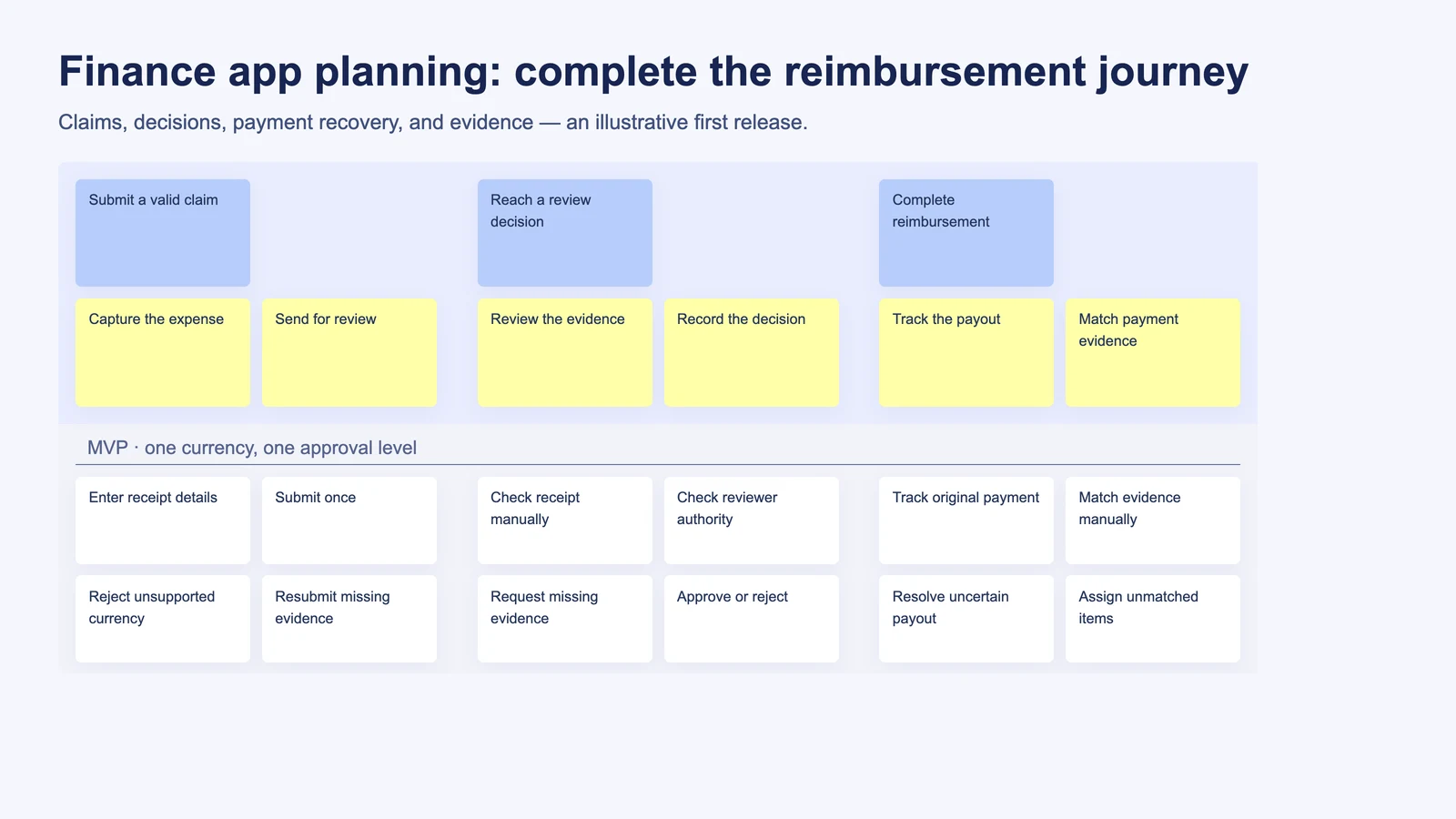
Use three goals: Submit a valid claim, Reach a review decision, and Complete reimbursement. The steps belong to those goals; stories sit beneath their relevant step. The employee, manager, and finance operator participate at different points.
The first detail covers submission and review. Notice that “Request missing evidence” belongs beside approval, and the employee has a route back into review. This closes a handoff that a list of screens can overlook.
The second detail follows the money. A timeout is not proof of failure. Tracking and resolving uncertainty must be available before a second attempt can be considered.
These are illustrative planning maps, not a customer implementation or a recorded MCP run. The card titles summarize the work; the claim and payout details still need the team's policy decisions.
Use StoriesOnBoard AI, MCP, and skills for different jobs
StoriesOnBoard AI Assist can help turn a product description into a starting map. Give it the three participants, the claim-to-reimbursement outcome, and the first-release boundaries. Review the proposed journey before treating its cards as an agreed backlog. The official map creation guide explains the in-product workflow.
For selected stories, use the in-card acceptance criteria capability to develop a starting proposal. Supply the agreed policy first: “no self-approval” is a product decision, not something the model should infer from the word “finance.”
The StoriesOnBoard MCP server connects an external agent to the board. The official tool reference documents reading map structure and card details, as well as creating and updating supported map content. This lets a review use the board's current context instead of a pasted list of titles.
Agent skills supply reusable instructions for working with that context. Use the five roles described in Five Skills, One Backlog as a sequence you can adapt:
| Skill | Task to give it |
|---|---|
product-discovery | Clarify participants, payment responsibilities, evidence sources, and unresolved policy questions. |
story-map-creator | Propose goals, steps, short story titles, one-line narratives, and release slices from the agreed brief. |
story-map-gap-finder | Review the existing journey against the ten areas above; distinguish missing behavior from deliberate exclusions. |
story-refiner | Develop selected stories into detailed descriptions and testable acceptance criteria. |
story-map-navigator | Help choose the next planning task and keep unresolved questions visible. |
The prompt below is an instruction to use with a connected agent and the relevant skill, not a claim that these skills are installed automatically. Approval and verification are workflow instructions; MCP itself is not a financial compliance or review guarantee.
Review our expense reimbursement map using story-map-gap-finder.
Read the current hierarchy, release scope, and relevant card details.
Check permissions, payment uncertainty, retries, stale data,
reconciliation, corrections, and the employee-to-reviewer handoff.
For each gap, identify who gets stuck, the consequence,
the proposed parent step, and a short story with a one-line narrative.
Separate deliberate exclusions from missing requirements.
Treat single currency and one approval level as agreed MVP limits.
Do not defer duplicate-payment prevention or unresolved-payment handling.
List unknown policies instead of inventing them.
Show the proposal before writing. After approval, apply agreed changes,
read them back, and report discrepancies or failed writes.
Inspect the gap report with product, engineering, and finance representatives. Reject duplicate proposals. Assign an owner to each unresolved policy. A useful result might be three missing stories and two decisions, rather than dozens of generic tickets. Our story map gap analysis guide covers the broader review method.
Refine the story where uncertainty could cause a second payout
After reviewing the proposed gaps, give story-refiner a narrow scope: the “Resolve uncertain payout” story and its existing notes. Ask it to preserve references, separate confirmed rules from assumptions, and propose changes before writing.
As a finance operator, I want to resolve an uncertain payout outcome so that I can reimburse the employee without sending the same payment twice.
- A timeout leaves the payout pending confirmation rather than marking it definitively failed.
- The claim shows the original operation reference and the last confirmed status check.
- Repeating the same instruction does not create a second payout for that claim.
- Later confirmation updates the original operation and remains linked to the claim.
- An unresolved outcome enters the operator's exception queue with an owner and a recorded next action.
The team must still choose the escalation timing and acceptable evidence for resolution. Keep those as open decisions until agreed. Review the resulting card in StoriesOnBoard after any agent write; a successful tool response alone does not establish that the story says what the team intended.
Choose a complete first release, with explicit limits
For this example, choose one organization, one reimbursement currency, one approval level, and one payment route. Include evidence correction, permission checks, payment uncertainty, duplicate prevention, and manual exception resolution. These support the promised outcome even when the ordinary path breaks.
Defer multiple currencies, configurable approval chains, automatic receipt extraction, and suggested transaction matches. A manual reconciliation queue can be a deliberate first-release choice when its owner, evidence, and expected workload are defined.
The important distinction is between a narrower product and an unfinished journey. Use MVP slicing with story maps to discuss that boundary. Do not automatically put every exception in a later release because it is less frequent.
Run a planning review before adding more features
Take one journey into a workshop with the people who own product behavior, implementation, and financial operations. At each step, answer five questions:
- Who may perform this action, and whose work comes next?
- What states can the user see, including unknown or delayed outcomes?
- What happens when the action fails, repeats, or receives late data?
- How can the user or operator recover, and who owns unresolved work?
- What observable evidence proves the step is complete?
Record the answers as stories, acceptance criteria, and explicit decisions. Validate them against your actual providers and policies. AI can help expose missing questions; the team remains responsible for the answers.
Start with one financial journey in StoriesOnBoard. Build the first map with AI Assist, connect an agent through MCP to review its gaps, and refine the few stories that determine whether users can finish the job. The useful output is a plan your team can inspect, challenge, and build.